Best CAD Software to Design Your Dream Boat – Quick Guide
When you set out to sketch a sleek yacht or a sturdy fishing vessel, the right CAD software can make the difference between a concept that floats and one that sinks. Modern boat designers rely on a mix of precision, fluid‑modeling tools, and marine‑specific analysis features to turn imagination into hulls that actually hit the water. Below is a fast‑track rundown of the most popular CAD packages that cater to both hobbyists and professional naval architects.
Rhino 3D – The Flexible Sculptor for Complex Hulls
Rhino 3D has earned a reputation for handling free‑form surfaces with ease, which is essential when you’re shaping the curved lines of a hull. Its NURBS‑based engine lets you fine‑tune every contour, and the extensive plugin ecosystem adds hydrostatic analysis and displacement calculations without leaving the interface.
- Strengths: Powerful surface modeling, intuitive viewport navigation, large community of marine‑design tutorials.
- Limitations: No built‑in parametric history; complex assemblies can become cumbersome.
- Best for: Designers who prioritize artistic freedom over strict parametric workflows.
AutoCAD – The Classic Drafting Tool with Marine Add‑Ons
AutoCAD remains a staple in many engineering firms, and its 2D drafting capabilities are still unmatched for creating detailed plan views, section cuts, and construction drawings. With the Marine Design Suite add‑on, you gain access to hull form generators and basic stability checks, bridging the gap between pure drafting and preliminary analysis.
- Strengths: Precise 2D drafting, widely recognized file formats, solid integration with BIM workflows.
- Limitations: 3D surface modeling isn’t as advanced as specialized tools; additional plugins may be required for full‑scale analysis.
- Best for: Teams that need reliable documentation and easy sharing with shipyards.
SolidWorks – Parametric Power for Production‑Ready Boats
SolidWorks shines when you need a design that can evolve through multiple iterations. Its parametric feature tree tracks every change, making it simple to tweak dimensions like beam width or keel height and instantly see the impact on the entire model. The integrated Simulation package also offers basic stress testing, useful for early‑stage structural assessments.
- Strengths: Robust parametric modeling, seamless part‑assembly management, built‑in motion studies.
- Limitations: Higher learning curve for complex surfacing; marine‑specific tools are limited compared to dedicated naval software.
- Best for: Professionals focused on production tolerances and repeatable design processes.
Fusion 360 – Cloud‑Based Design for Collaborative Boat Projects
Fusion 360 brings the convenience of a cloud platform to the world of naval design. Its hybrid modeling approach lets you switch between sculpting surfaces and building parametric parts within the same file. Collaboration is a breeze—team members can comment, iterate, and run simulations without juggling large local files.
- Strengths: Affordable subscription, integrated CFD and stress analysis, real‑time collaboration.
- Limitations: Dependent on internet connectivity for full functionality; advanced hull‑form tools are still evolving.
- Best for: Small design studios or DIY builders who value flexibility and budget‑friendly options.
Maxsurf – The Marine‑Focused Powerhouse
If your priority is accurate hydrodynamics, Maxsurf stands out as a purpose‑built solution for naval architects. It offers a suite of modules covering everything from initial hull form creation to resistance prediction, seakeeping, and structural analysis. The learning curve is steeper, but the depth of marine‑specific insight is hard to match.
- Strengths: Comprehensive hull analysis, industry‑standard for shipyards, integrated workflow from concept to production.
- Limitations: Expensive licensing, steep onboarding; overkill for simple recreational boat designs.
- Best for: Professional naval architects and commercial shipbuilding firms.
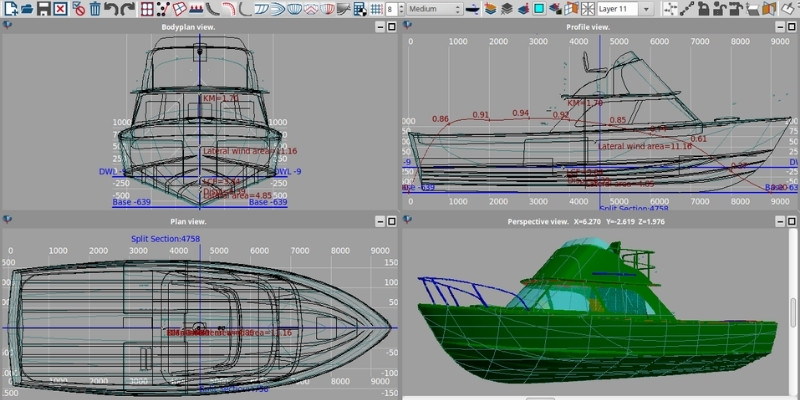
DelftShip – Lightweight 3D Modeling for Small Vessels
DelftShip targets the niche of small‑craft designers who need quick hull generation without a massive software suite. Its parametric hull builder lets you input basic dimensions—length, beam, draft—and instantly visualizes a 3D model, complete with hydrostatic tables. Export options include STL for 3D printing, making it popular among hobbyists.
- Strengths: Easy to learn, fast hull generation, free version available for basic projects.
- Limitations: Limited advanced surfacing tools; not suited for intricate superstructure modeling.
- Best for: Amateur boat builders and educational settings.
Onshape – Browser‑Based CAD for On‑The‑Go Design
Onshape’s fully browser‑based environment eliminates the need for powerful workstations. Its real‑time version control and public/private sharing make it ideal for distributed teams. While it doesn’t specialize in marine analysis, you can pair it with external CFD tools via its API to achieve a complete design loop.
- Strengths: No installation required, robust collaboration, automatic backups.
- Limitations: Requires a subscription for advanced features; marine‑specific modules are lacking.
- Best for: Remote teams that need a unified platform without heavy hardware.
Frequently Asked Questions
Which CAD software is best for beginners wanting to design a small boat?
DelftShip and Fusion 360 are often recommended. DelftShip offers a straightforward hull generator, while Fusion 360 provides a gentle learning curve with plenty of tutorials and a low‑cost subscription.
Do I need a marine‑specific CAD package for professional yacht design?
Professional naval architects usually rely on Maxsurf or Rhino combined with dedicated analysis plugins. These tools deliver the hydrostatic and resistance data required for certification and large‑scale production.
Can I run structural analysis directly within the CAD program?
Some packages, like SolidWorks and Fusion 360, include built‑in simulation modules that handle basic stress testing. For more detailed marine structural analysis, you’ll likely need a specialized add‑on or a separate tool such as ANSYS.
Is cloud‑based CAD secure for proprietary boat designs?
Reputable providers (Fusion 360, Onshape) use enterprise‑grade encryption and offer permission controls. Still, many firms keep sensitive intellectual property on‑premise with software like Rhino or SolidWorks for added security.