How Orthanc and ImageJ Transform Medical Imaging Workflows
When it comes to handling DICOM datasets, two open‑source tools have quietly become a powerhouse partnership: Orthanc, the lightweight PACS server, and ImageJ, the versatile image‑analysis platform. Together they let radiologists, researchers, and developers pull, process, and share medical images without the overhead of costly commercial systems. In this article we’ll unpack what each component brings to the table, explore how they talk to each other, and highlight practical scenarios where the combo shines.
Orthanc: A Minimalist PACS That Gets Out of Your Way
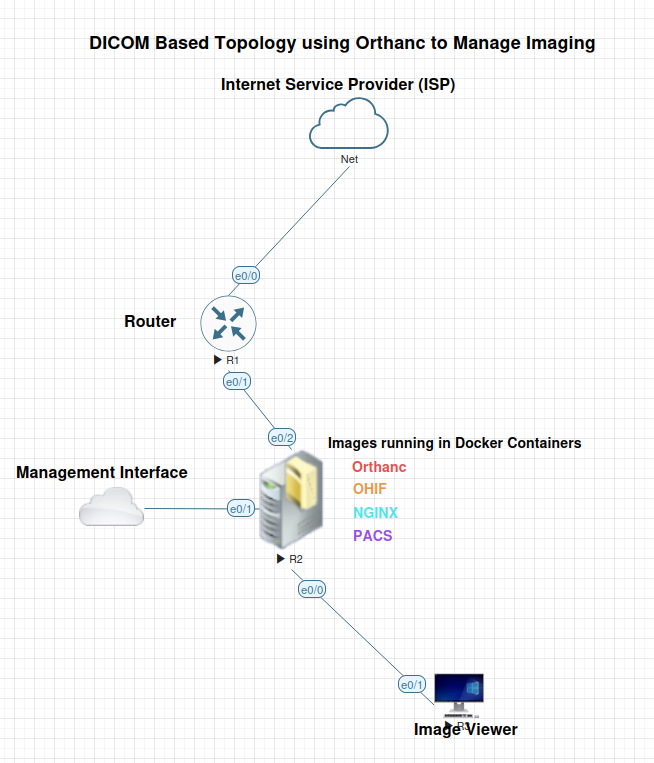
Orthanc was designed to store, retrieve, and query DICOM files with a RESTful API that feels more like a modern web service than a traditional picture‑archiving system. Because it runs on a single executable and requires only a modest SQLite or PostgreSQL backend, hospitals and labs can spin it up on a workstation, a Raspberry Pi, or a cloud VM in minutes.
Key features include:
- Automatic indexing of studies, series, and instances for fast searches.
- Built‑in DICOMweb support (QIDO‑RS, WADO‑RS) for web‑based viewers.
- Extensible plugins written in C++, Python, or Lua, allowing custom routing or anonymization.
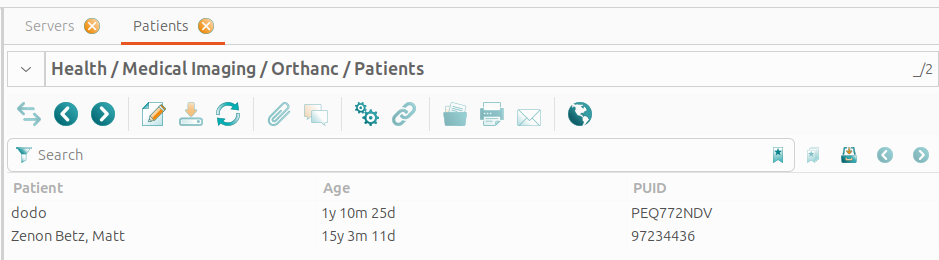
All of this is wrapped in a clean web dashboard that shows you incoming studies at a glance, making it easy to monitor a busy imaging department.
ImageJ: The Swiss‑Army Knife of Image Analysis
ImageJ started life as a simple image viewer for microscopy, but its plugin architecture has turned it into a universal analysis engine. From 2‑D pixel intensity histograms to 3‑D volume rendering, the platform can handle anything from a single CT slice to a whole‑body MRI series.
What makes ImageJ especially attractive to the medical community is its ability to read DICOM metadata directly, preserving patient‑specific information that many consumer‑grade tools discard. Moreover, the open‑source community has contributed thousands of plugins for tasks like segmentation, registration, and quantitative measurement.
Why Pair Them? Complementary Strengths in Action
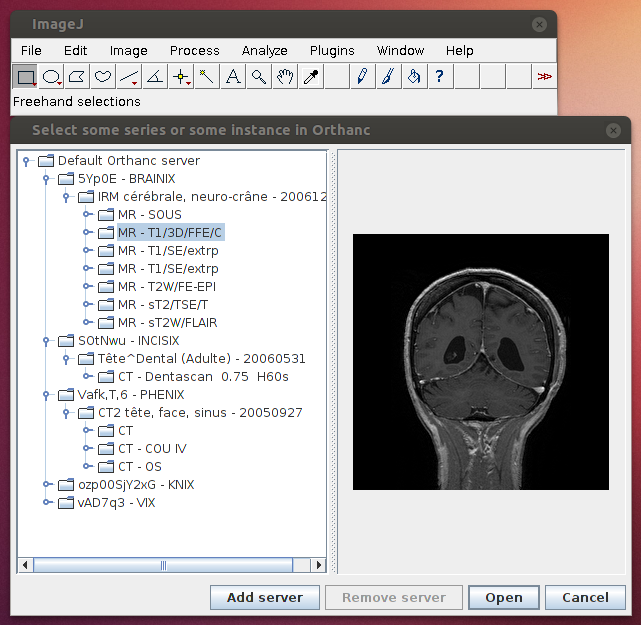
Orthanc excels at data management, while ImageJ shines at analysis. When you connect the two, you get a seamless loop: Orthanc serves the raw DICOM files, ImageJ pulls them for processing, and the results can be pushed back to Orthanc for storage or sharing.
This workflow eliminates the need for manual export‑import steps that often introduce errors or data loss. For example, a radiology researcher can schedule a nightly job that queries Orthanc for all new chest CT scans, runs a lung‑nodule detection plugin in ImageJ, and writes the segmentation masks back into Orthanc as DICOM‑SR objects.
Setting Up the Integration: A Step‑by‑Step Overview
1. Install Orthanc. Download the appropriate package for your OS, launch the server, and point the web UI to http://localhost:8042. Verify that you can view a sample study via the built‑in viewer.
2. Deploy ImageJ. Grab the latest version from the official site, then add the “Dicom_Reader” and “Orthanc_Connector” plugins (available on GitHub). These extensions let ImageJ communicate with Orthanc's REST API.
3. Configure authentication. In Orthanc’s config.json, enable token‑based auth and generate a secret token. Store this token in ImageJ’s plugin settings so that each request is authorized.
4. Write a simple macro. ImageJ macros can fetch a study ID, download the series as a stack, apply a filter, and POST the result back. A minimal example looks like this:
url = "http://localhost:8042/instances/{id}/file";run("Dicom_Reader", "url="+url);
run("Gaussian Blur...", "sigma=2");
run("Orthanc_Uploader", "url=http://localhost:8042/instances");
5. Automate with a scheduler. Use cron (Linux) or Task Scheduler (Windows) to trigger the macro whenever new data lands in Orthanc. Monitoring logs will alert you to any failed uploads.
Real‑World Use Cases That Showcase the Duo
Rapid Research Prototyping
In academic labs, investigators often need to test novel image‑processing algorithms on real patient data. By pulling de‑identified scans from Orthanc, they can iterate on ImageJ macros without dealing with cumbersome data‑transfer paperwork. Once a method proves robust, the same pipeline can be packaged as an Orthanc plugin for broader clinical use.
Quality Assurance in Radiology
Radiology departments can set up a nightly QC routine that extracts all head CTs, runs a noise‑measurement plugin, and flags studies that exceed preset thresholds. The flagged reports are stored as DICOM‑SR objects in Orthanc, where technologists can review them alongside the original images.
Teaching and Training
Medical schools benefit from a sandbox environment where students explore image segmentation in ImageJ while Orthanc supplies a curated library of anonymized cases. Because both tools are free, institutions can scale the lab without licensing constraints.
Best Practices and Common Pitfalls
Secure your endpoints. Even though Orthanc runs locally by default, exposing it on a network invites unauthorized access. Always enable HTTPS and enforce strong authentication tokens.
Mind the metadata. Some ImageJ plugins strip away DICOM tags inadvertently. Verify that essential fields—patient ID, study date, modality—remain intact after processing, especially if you intend to feed results back into a clinical PACS.
Version compatibility. Orthanc’s API evolves slowly, but occasional breaking changes happen. Pin your ImageJ plugins to a specific Orthanc release, or test upgrades in a staging environment before deploying to production.
FAQ
Can Orthanc and ImageJ handle large multi‑modal studies? Yes. Orthanc streams DICOM files on demand, so memory consumption stays low. ImageJ can open a series as a virtual stack, allowing analysis of hundreds of slices without loading them all into RAM.
Is it possible to use the duo for real‑time imaging? While Orthanc can receive incoming streams from modalities, ImageJ’s processing is generally batch‑oriented. For true real‑time feedback, you’d need a dedicated workstation running low‑latency plugins, but many use cases (e.g., overnight research pipelines) work perfectly with a slight delay.
Do I need programming skills to get started? Basic familiarity with installing software and editing JSON files is enough. The macro language in ImageJ is simple, and many community‑contributed scripts are ready to copy‑paste.
Are there commercial alternatives that outperform this setup? Enterprise PACS and proprietary analysis suites may offer tighter integration and vendor support, but they come with licensing fees and less flexibility. For most academic, research, and small‑clinic scenarios, Orthanc + ImageJ delivers comparable functionality at a fraction of the cost.
Whether you’re building a research pipeline, tightening quality control, or simply curious about open‑source medical imaging, pairing Orthanc with ImageJ gives you a powerful, low‑cost foundation. The key is to treat Orthanc as the data steward and ImageJ as the analytical engine—let each do what it does best, and watch your workflow become smoother, faster, and more reproducible.