How to Build an IT Project Roadmap: A Complete Guide
Why a Roadmap Is the Backbone of Successful Projects
Every IT initiative, whether it’s a cloud migration or a new app rollout, needs a clear path forward. An IT project roadmap translates lofty goals into concrete milestones, aligning stakeholders, budgets, and timelines. Without it, teams often drift into scope creep, missed deadlines, or budget overruns. The roadmap acts like a navigation chart—providing direction while allowing room to adjust course when unexpected challenges arise.
Core Elements Every Roadmap Should Contain
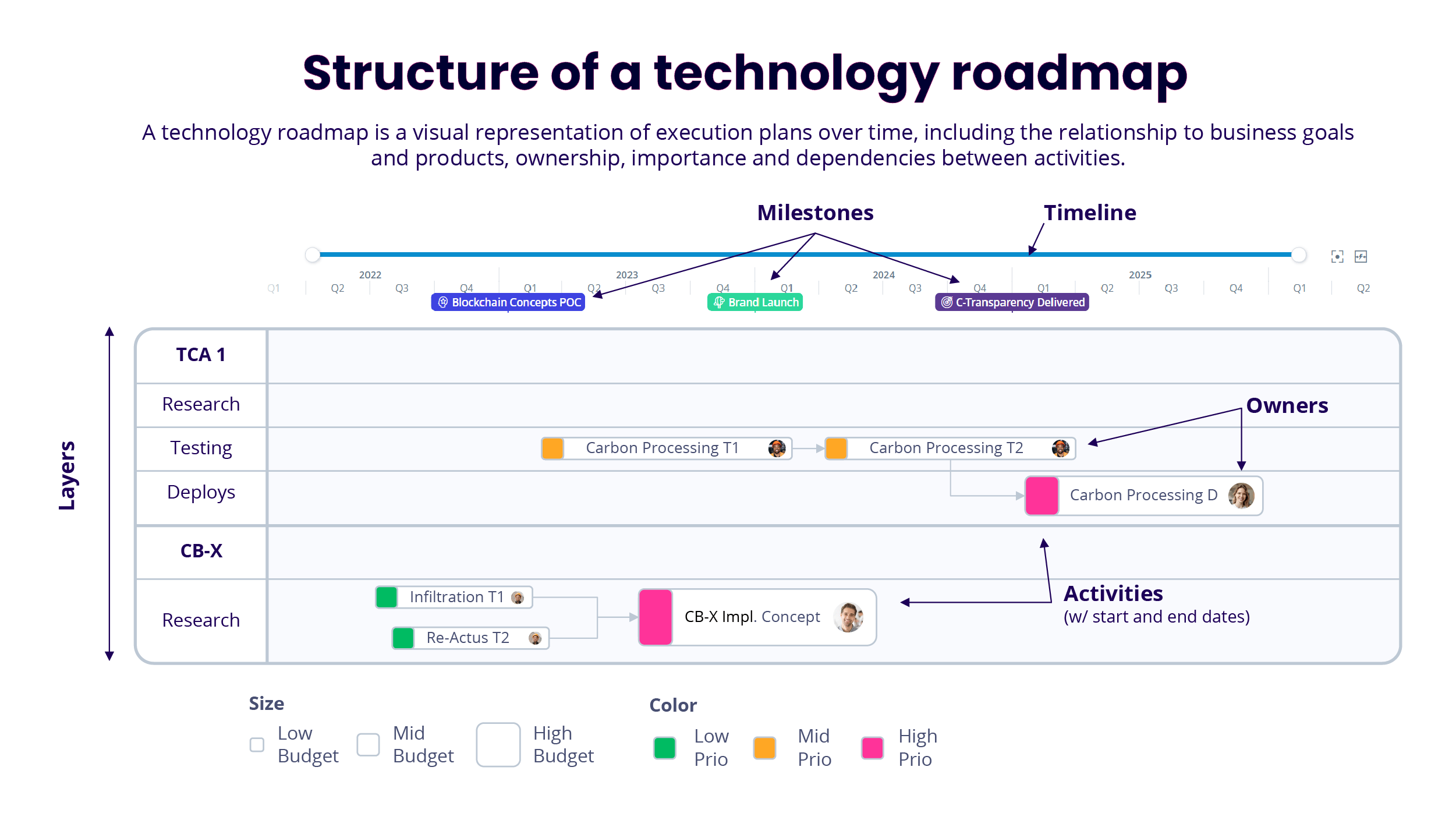
Think of a roadmap as a layered document. At the top level you have the strategic vision, then the phases, and finally the detailed tasks. The most common components include:
- Strategic objectives: The “why” behind the project, linked to business outcomes.
- Major phases: Typically discovery, design, development, testing, and deployment.
- Key deliverables: Tangible outputs for each phase, such as a requirements document or a beta release.
- Timeline: High‑level dates that show when each phase should start and finish.
- Resource allocation: Who’s responsible, what skill sets are needed, and any external partners.
- Risk and mitigation: Potential blockers and how you plan to address them.
When these pieces are plotted together, the roadmap becomes a living reference that guides day‑to‑day decisions without overwhelming the team with minutiae.
Step‑by‑Step Process to Craft Your Roadmap
Creating a useful roadmap isn’t a one‑size‑fits‑all activity, but the following workflow works for most organizations.
- Clarify business goals. Start with a brief workshop that gathers executives, product owners, and end‑users. Capture measurable outcomes—like “reduce ticket resolution time by 20%” or “increase mobile app adoption to 30% of the customer base.”
- Define scope and boundaries. List the features or services that will be in‑scope and, just as importantly, what will be excluded. This prevents endless feature creep later on.
- Break work into phases. Map high‑level activities onto logical stages. For a typical software project, you might have: Discovery, Architecture, Development, QA, Release, and Post‑Launch Support.
- Assign milestones and dates. For each phase, choose a few concrete milestones—e.g., “Complete functional prototype” or “Finish security audit.” Attach realistic dates, keeping buffer time for unforeseen delays.
- Allocate resources. Identify team leads, required skill sets, and any third‑party vendors. A simple RACI matrix can clarify responsibilities.
- Identify risks. Conduct a quick risk‑assessment exercise. For each high‑impact risk, note a mitigation strategy—such as “backup vendor contracts” for potential supply‑chain issues.
- Iterate and validate. Share the draft with all stakeholders. Incorporate feedback, then lock the high‑level version while allowing the detailed task list to evolve in an agile backlog.
Following these steps ensures the roadmap reflects both strategic intent and operational reality.
Common Pitfalls and How to Sidestep Them
Even seasoned project managers can trip up on a few recurring traps.
- Over‑detail. Packing every user story onto the roadmap creates noise. Keep it high‑level; detailed tasks belong in the sprint backlog.
- Static mindset. Treating the roadmap as immutable leads to friction when priorities shift. Schedule regular (e.g., quarterly) reviews to adjust timelines or scope.
- Ignoring dependencies. Failing to map out inter‑team or technology dependencies often results in bottlenecks. Visual arrows or a simple dependency matrix can surface these early.
- Under‑estimating effort. Optimistic date estimates erode credibility. Use historical velocity data or consult subject‑matter experts to ground timelines.
By staying aware of these issues, you can keep the roadmap both realistic and adaptable.
Tools and Templates That Make Life Easier
While a whiteboard and sticky notes work for small teams, larger initiatives benefit from digital solutions. Popular choices include:
- Microsoft Project – robust Gantt‑chart capabilities and resource leveling.
- Jira Portfolio – integrates directly with agile backlogs, offering scenario planning.
- Aha! – excels at linking strategic goals to feature roadmaps.
- Google Sheets – a low‑cost, flexible option for teams that prefer a spreadsheet view.
Most tools provide templates that already contain the core sections outlined earlier. Customize a template rather than starting from scratch; it saves time and ensures you don’t miss critical elements.
Quick FAQ
What’s the difference between a project roadmap and a product roadmap?
A project roadmap focuses on the execution timeline, resources, and milestones needed to deliver a specific initiative. A product roadmap, by contrast, emphasizes feature releases and market strategy over a longer horizon.
How often should I update my IT project roadmap?
At a minimum, review it at the end of each major phase. Many organizations also schedule a quarterly checkpoint to incorporate new business priorities or technical discoveries.
Can a roadmap be used for both waterfall and agile projects?
Yes. For waterfall, the roadmap aligns closely with phase gates. In agile, it serves as a high‑level vision that guides sprint planning without dictating daily tasks.