How to Choose the Right Figma Pricing Plan for You
Figma pricing can feel like a maze, especially when you’re juggling a growing design team and tight budgets. Whether you’re a solo freelancer, a startup, or an enterprise with hundreds of collaborators, the right plan can unlock features that keep your workflow smooth without breaking the bank. Below we break down each tier, the factors that matter most, and how to make the switch without a hitch.
Understanding Figma’s Tiered Plans
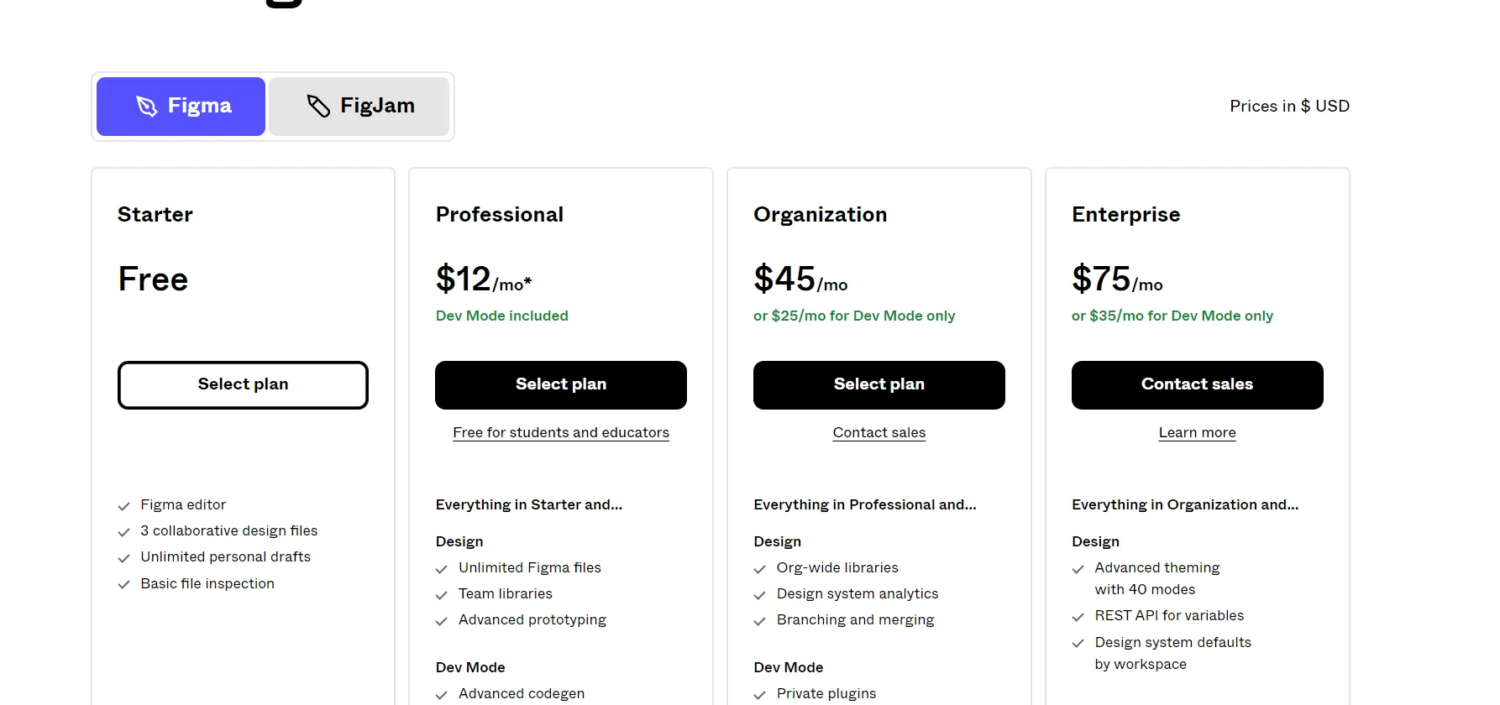
Figma offers four main subscription levels, each built around a different set of needs. The free tier gives you a taste of the platform, while the paid options add depth, security, and administrative control.
Free tier: what you get
- Unlimited viewers and commenters.
- Three projects with up to two editors per file.
- 30‑day version history.
- Access to community plugins and templates.
Professional tier: who it’s for
- Unlimited editors and projects.
- Unlimited version history.
- Advanced sharing permissions.
- Design system analytics and libraries.
- Paid at $12 per editor/month (billed annually) or $15 month‑to‑month.
Organization tier: scaling teams
- Everything in Professional, plus:
- Team libraries with granular access controls.
- Single sign‑on (SSO) and domain‑based provisioning.
- Audit logs and usage reporting.
- Starter pricing at $45 per editor/month (annual).
Enterprise tier: custom needs
- All Organization features.
- Advanced security (SCIM provisioning, advanced SSO).
- Dedicated account manager and premium support.
- Custom pricing based on organization size and requirements.
Key factors to consider before picking a plan
Team size and collaboration intensity. If you have more than a handful of designers working simultaneously, the free tier’s editor limit will quickly become a bottleneck.
Version history depth. For long‑running projects, retaining an unlimited history can save hours of rework when you need to roll back to a previous iteration.
Design system complexity. Organizations that rely on shared component libraries benefit from the analytics and permission controls found in Professional and higher tiers.
Security and compliance. Enterprises handling sensitive data often require SSO, audit logs, and SCIM provisioning—features locked behind Organization or Enterprise plans.
Cost breakdown and budgeting tips
Figma’s pricing is per editor, not per file, which means adding a new designer directly raises your monthly cost. If you can predict headcount fluctuations, consider the following:
- Annual billing saves roughly 20%. Most teams find the commitment worthwhile for the discount.
- Batch adding editors. Adding several users at once triggers a one‑time onboarding fee, but the per‑editor rate stays the same.
- Leverage the free tier for occasional contractors. Invite them as viewers or commenters to keep costs down.
- Watch for hidden add‑ons. Plugins themselves are free, but some third‑party integrations charge separate subscriptions.
How to switch or upgrade plans
Changing your plan is a straightforward process in the Figma admin console:
- Log in as an admin and navigate to Settings > Billing.
- Select “Change Plan” and choose the tier that matches your needs.
- Review the per‑editor pricing, confirm the number of editors, and decide between monthly or annual billing.
- Enter payment details; the new plan becomes active at the start of the next billing cycle.
If you need to downgrade, you can reduce editor seats after the current cycle ends—no prorated refunds, but you won’t be charged for unused seats.
Frequently Asked Questions
Can I mix free and paid editors on the same team?
Yes. Free editors can be added as viewers or commenters, while paid editors get full editing rights. This hybrid approach helps keep costs low for occasional contributors.
Do I lose my design history if I downgrade?
When you move from a paid tier to the free tier, version history reverts to the 30‑day limit. Anything older than that remains archived but isn’t directly accessible from the UI.
Is there a discount for non‑profits or educational institutions?
Figma offers a 50% discount on the Professional plan for verified non‑profits and schools. You’ll need to provide proof of eligibility through their partner portal.