How to Make the Most of Facebook Marketplace Right Now
If you’ve scrolled past a neighbor’s garage‑sale post or spotted a “free couch” in your feed, you’ve already brushed against Facebook Marketplace. It’s the social network’s answer to Craigslist, but with the built‑in trust of a friend list and the convenience of a mobile‑first design. Whether you’re hunting for a bargain or looking to declutter, today’s version of the platform offers tools and quirks that can turn a casual swipe into a serious transaction.
Why Facebook Marketplace Still Matters in 2024
Unlike niche classifieds sites, Facebook Marketplace leverages the massive user base of the parent app. That means you’re not just reaching strangers; you’re connecting with people who share a city, a school district, or even a mutual friend. The “local feel” boosts response rates and often speeds up negotiations, because buyers can see a seller’s profile and gauge credibility at a glance.
Another advantage is integration. Listings appear directly in the news feed, in a dedicated tab, and even in Messenger conversations. This omnipresence reduces the friction of opening a separate website or app, making it easier to spot impulse deals while you’re already scrolling.
Features You Should Be Using Today
Facebook has layered several upgrades onto Marketplace over the past year. Here are the ones that matter most:
- Boosted Listings: For a modest fee, sellers can promote their items to a wider audience within a specific radius, increasing visibility without leaving the platform.
- Saved Searches & Alerts: Buyers can save a search query (e.g., “vintage leather jacket”) and receive push notifications when new items match, ensuring they don’t miss a hot find.
- Secure Checkout: Certain categories now support in‑app payments, giving both parties a record of the transaction and reducing cash‑on‑hand risks.
- Item Condition Filters: You can filter by “New,” “Like New,” or “Used,” which helps narrow down listings that fit your expectations without endless scrolling.
These tools aren’t mandatory, but they can shave minutes off the buying or selling process—time that often translates into better deals.
Tips for Sellers: Stand Out in a Crowded Feed
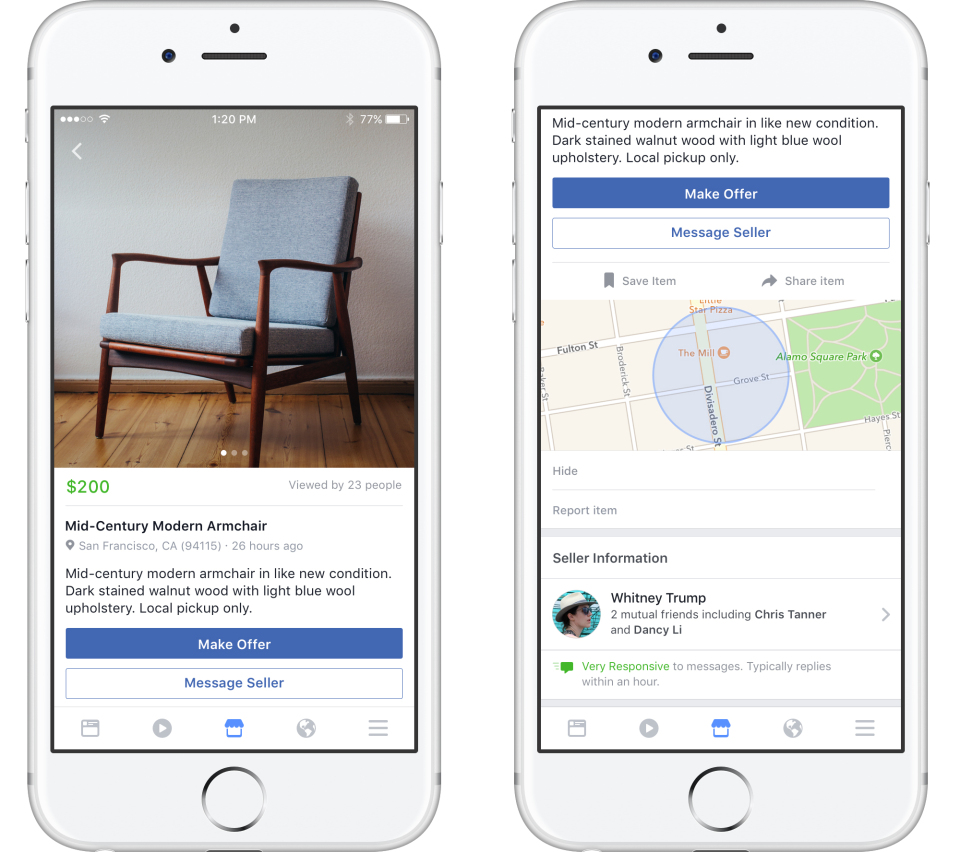
Listing an item is easy; making it sell fast takes a bit more thought. Start with a clear, well‑lit photo taken from multiple angles. A single, blurry image will likely be scrolled past, while a crisp photo with a clean background invites curiosity.
Next, craft a concise title that includes the brand and key feature. Instead of “Nice Chair,” try “IKEA POÄNG Armchair – Excellent Condition, $45.” The title should answer two questions at a glance: what is it, and why is it worth noticing.
Pricing strategy matters, too. Research similar listings in your neighborhood and price slightly below the median if you want a quick sale. If you’re willing to negotiate, add “or best offer” to signal flexibility.
Finally, respond promptly. Buyers often reach out to multiple sellers, and a delayed reply can cost you the sale. Enable Messenger notifications for Marketplace or set up quick replies that confirm interest and propose a meeting spot.
Tips for Buyers: Snag the Best Deals Without the Hassle
When you’re on the hunt, patience combined with a strategic approach pays off. Start by setting a realistic budget and using the filter tools to eliminate out‑of‑range items. Saved searches keep you in the loop without constant manual checking.
Don’t be shy about making an offer. Most sellers list at the high end of their price range, expecting negotiation. A polite message like “I love the bike, would you consider $120?” often opens the door to a compromise.
Arrange a safe meeting place—many police departments now designate “exchange zones” in parking lots. Bring cash in exact change or use the secure checkout option if it’s available for the item.
Safety First: Trust But Verify
Because Facebook ties listings to personal profiles, it already offers a layer of accountability. Still, treat every transaction as you would with a stranger.
- Check the seller’s profile: a history of posts, friends, and recent activity suggests a real person.
- Avoid sharing sensitive personal information beyond what’s needed for the exchange.
- Meet in public during daylight hours, and if possible, bring a friend.
- If a deal feels too good to be true—especially for high‑value items—trust your gut and walk away.
By following these precautions, you reduce the risk of scams while still enjoying the convenience of the platform.
What’s Next for Facebook Marketplace?
Looking ahead, Facebook is experimenting with AI‑driven recommendations that match buyers with items based on past behavior, much like a personalized shopping assistant. Expect tighter integration with Instagram Shops, allowing sellers to cross‑post listings and reach even broader audiences.
There’s also talk of expanding the secure checkout to more categories, which could make the platform a one‑stop shop for everything from furniture to electronics. As these features roll out, the line between social networking and e‑commerce will blur further, making Marketplace an increasingly vital part of everyday transactions.
Quick FAQ
Q: Can I sell services on Facebook Marketplace?
A: Currently, Marketplace focuses on tangible goods, but you can list services in the “Classifieds” section or promote them via local groups.
Q: How do I report a suspicious listing?
A: Click the three dots on the listing, select “Report,” and choose the reason. Facebook reviews reports and may remove the post if it violates policies.
Q: Is there a fee for buying items?
A: Buying is free. Sellers only pay if they choose to boost a listing or use paid checkout features.
Q: Can I filter listings by distance?
A: Yes—use the “Location” filter to set a radius, ranging from a few miles up to a statewide search.
:max_bytes(150000):strip_icc()/facebookmarketplace02-5c8dfc4446e0fb00014a96f3.jpg)