How to Use Free Proxy Servers to Unblock YouTube Videos
Why You Might Need a Proxy for YouTube
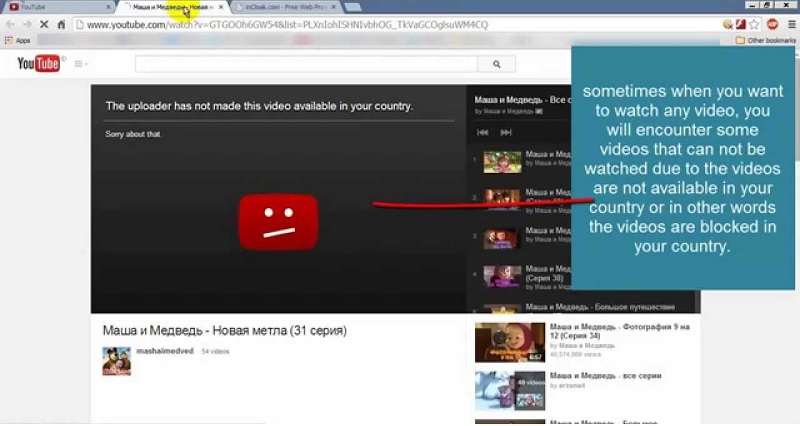
Whether you’re traveling abroad, stuck behind a school firewall, or working in an office that blocks streaming sites, you’ve probably run into the dreaded “This video is unavailable in your country” message. The restriction isn’t always about copyright; sometimes it’s a network policy that treats YouTube as a bandwidth hog. In those moments a free proxy server can act as a middle‑man, making it appear as if your request originates from a location where the video is allowed.
What Is a Free Proxy Server?
A proxy server is simply a computer that sits between your device and the internet. When you request a YouTube page, the proxy fetches the content, then forwards it back to you. Free proxies are offered at no cost, often by volunteers or ad‑supported services. They come in several flavors: web‑based proxies that let you paste a URL into a form, HTTP proxies that work with most browsers, and SOCKS proxies that handle a broader range of traffic.
Pros and Cons of Free Proxies
- Pros: No subscription fee, quick to set up, and useful for occasional unblocking.
- Cons: May inject ads, can be slower than paid options, and sometimes log your activity.
- Security note: Because you’re trusting a third‑party server with your data, free services are more likely to expose you to malware or snooping.
Step‑by‑Step Guide to Unblocking YouTube with a Free Proxy
Below is a practical workflow that works on most desktop browsers. Adjust the steps slightly if you’re on a mobile device.
Choosing a Reliable Free Proxy
- Look for services that support HTTPS; this encrypts the traffic between you and the proxy.
- Check recent user reviews—sites that are constantly down or flagged for spam aren’t worth your time.
- Avoid proxies that ask for personal information beyond a simple email for alerts.
Using a Web‑Based Proxy
Web‑based proxies are the easiest entry point. Visit a site such as KProxy, HideMyAss, or Proxysite. You’ll see a field where you can paste the YouTube video URL. After hitting “Go,” the proxy loads the page on your behalf. If the video plays, you’re done. If the proxy itself is blocked, try a different service or switch to a browser extension.
Setting Up a Browser Proxy Extension
For a smoother experience, install a proxy extension for Chrome or Firefox. Once added, open the extension’s settings, enter the proxy address (e.g., 123.45.67.89:8080), and save. Most extensions let you toggle the proxy on and off with a single click, which is handy when you only need YouTube unblocked occasionally. Remember to enable “Use this proxy server for all protocols” if the extension offers that option.
Staying Safe While Bypassing Restrictions
Free proxies can be a double‑edged sword. To protect your privacy, always browse YouTube over HTTPS—most modern browsers force this automatically. Avoid entering login credentials on proxy sites; instead, log in to YouTube directly after the video loads. If you notice strange pop‑ups or a sudden slowdown, close the tab and consider switching to a reputable VPN, which, while not free, offers stronger encryption and no ad injection.
Common Pitfalls and How to Fix Them
Even the best free proxy can stumble. If a video buffers endlessly, the proxy’s bandwidth might be saturated; try a different server or a less popular proxy. Some networks block known proxy IP ranges—if that’s the case, look for “anonymous” or “elite” proxies that hide your origin more effectively. Finally, remember that certain YouTube videos are age‑restricted or set to private; a proxy can’t bypass those settings.
FAQ
- Can I use a free proxy on my phone? Yes. Most mobile browsers let you configure a proxy in their network settings, and many web‑based proxies work fine on Android and iOS browsers.
- Do free proxies slow down YouTube? They often do, especially during peak usage times, because the traffic passes through an extra server that may be shared with many users.
- Is it legal to bypass YouTube restrictions? In most jurisdictions, accessing publicly available content isn’t illegal, but you should respect local laws and any terms of service that apply to your network.
- Will a proxy protect me from malware? Not necessarily. While some proxies filter out known threats, many simply relay data unchanged. Use reputable security software alongside any proxy.

![[IOS ONLY] How To Watch Blocked YouTube Videos On Mobile! | Unblock ...](https://i.ytimg.com/vi/s4urel1J_bg/maxresdefault.jpg)