How to Use the CDCR Inmate Locator: A Step‑By‑Step Guide
If you’ve ever needed to confirm whether a loved one, a business associate, or even a historical figure is housed in a California state prison, the CDCR Inmate Locator is the tool you’ll reach for. It’s a free, publicly available database maintained by the California Department of Corrections and Rehabilitation (CDCR). While the interface looks straightforward, many first‑time users miss a few handy tips that can save time and prevent frustration. This guide walks you through the process from opening the website to interpreting the results, all in plain language.
What Is the CDCR Inmate Locator?
The CDCR Inmate Locator is an online search engine that pulls information from the department’s internal records. It can confirm a person’s current incarceration status, facility location, projected release date, and sometimes even a brief custody profile. The data is updated regularly, but it’s important to remember that it reflects only inmates who are currently under CDCR jurisdiction. Federal prisoners, those transferred to out‑of‑state facilities, or individuals who have been released within the past 24‑48 hours may not appear instantly.
Step 1: Access the Official CDCR Site
Start by navigating to the official CDCR website. The URL is www.cdcr.ca.gov. Avoid third‑party sites that claim to offer “instant inmate searches” for a fee; they often republish the same public data and may try to collect personal information. On the homepage, look for a navigation tab labeled “Inmate Information” or “Inmate Locator.” Clicking that link takes you directly to the search page.
Step 2: Choose the Right Search Option
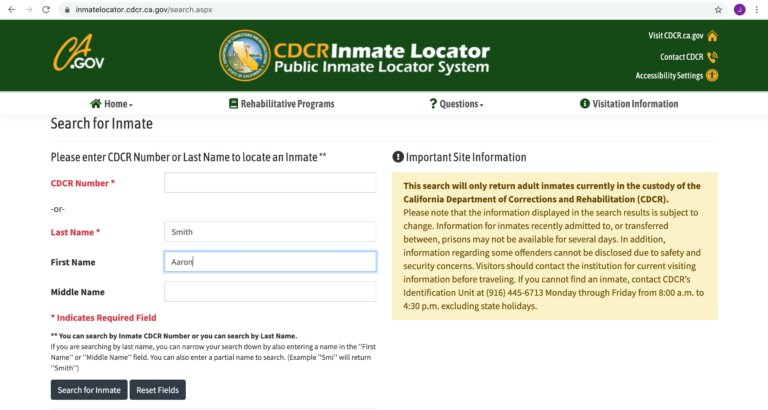
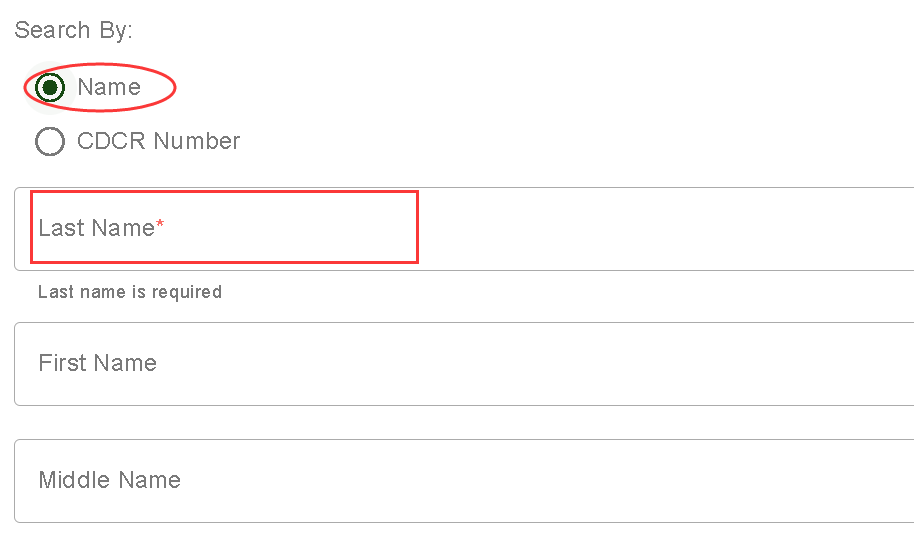
The locator offers two primary entry points: searching by name or by CDCR number (the unique identification number assigned to each inmate). If you already know the CDCR number, that’s the fastest route—just type the digits into the “CDCR #” field and hit “Search.” If you only have a name, select the “Name” tab. The system accepts first, middle, and last names, but remember to use the spelling as it appears on official documents for best results.
Step 3: Fill in the Required Details
When searching by name, you’ll see several optional boxes:
- First Name – Enter the given name.
- Middle Name or Initial – Helpful if the person has a common first and last name.
- Last Name – Always required.
- Birth Year – Adding this narrows results dramatically, especially for names like “John Smith.”
After entering the information, click the “Search” button. The system will display a list of matches, each accompanied by a brief snapshot: CDCR number, age, gender, and the facility where the inmate is housed.
Step 4: Review the Inmate’s Profile
Click on the CDCR number of the individual you’re interested in. This opens a detailed record page that typically includes:
- Full legal name and aliases.
- Current facility name and address.
- Custody classification (e.g., minimum, medium, maximum security).
- Projected release date, if available.
- Offense details and sentencing information.
Take note that certain fields, like the exact offense description, may be abbreviated to protect privacy. If the inmate has been transferred recently, the “Facility” line may list “Pending Transfer,” which means the system is waiting for the new location to be entered.
Step 5: Understand the Limitations
While the CDCR Inmate Locator is reliable, it isn’t infallible. Here are a few common pitfalls:
- Recent releases may still appear for up to 48 hours after an inmate leaves custody.
- Administrative holds (e.g., for court appearances) can temporarily hide an inmate from the public view.
- Name variations such as nicknames or misspellings will not return results; double‑check spelling against official documents.
If you encounter a dead end, consider contacting the facility directly using the phone number listed on the profile page. Most prisons have a dedicated public information line that can confirm an inmate’s status.
Step 6: Keep a Record of Your Search
For future reference, copy the URL of the inmate’s profile page or take a screenshot. The CDCR does not provide a printable “official” document, but a saved copy can be useful for legal paperwork, visitation planning, or simply verifying the information later. Remember that the data is subject to change; revisiting the locator after a few weeks is a good practice if you need the most up‑to‑date status.
Tips for a Smoother Experience
Even a straightforward tool can feel clunky without a few insider tricks. Here are some quick recommendations:
- Use the birth year whenever possible to filter out unrelated matches.
- Try different name orders (e.g., “Doe, Jane” vs. “Jane Doe”) if the first search yields too many results.
- Check the “Advanced Search” link for additional filters like gender or facility type.
- Bookmark the locator page so you can return without navigating the main CDCR site again.
Frequently Asked Questions
Can I search for federal inmates using the CDCR Inmate Locator?
No. The CDCR Inmate Locator only covers individuals under California state jurisdiction. For federal inmates, you’ll need to use the Bureau of Prisons Inmate Locator at bop.gov.
Is there a cost to use the CDCR Inmate Locator?
The service is completely free. Any site that asks for payment is either a scam or a third‑party service that adds no new information.
What should I do if the inmate’s name doesn’t appear?
First, verify the spelling and try adding the birth year. If the person was recently released, wait a couple of days and search again. If the issue persists, contacting the prison directly is the most reliable next step.
Can I receive notifications when an inmate’s status changes?
The CDCR does not offer an automated alert system. Some private vendors provide monitoring services, but they charge fees and rely on the same public data, so they’re not officially endorsed.




_0.png?w=3800&h=2000)