How to Use YouTube TV for Business: A Complete Guide
If you’ve ever tried to turn a living‑room streaming setup into a conference‑room backdrop, you know the headache of licensing, device compatibility, and endless cable bills. YouTube TV for Business promises a more streamlined answer, but it isn’t a plug‑and‑play miracle. This guide walks you through the why, what, and how of deploying YouTube TV in a commercial setting, so you can decide whether it fits your workplace, restaurant, or waiting‑room needs.
YouTube TV for Business: What You Need to Know
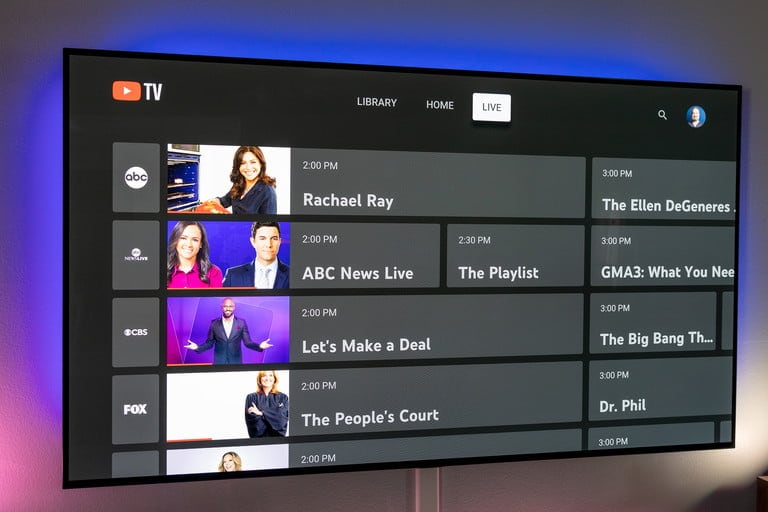
First things first: YouTube TV is a subscription‑based live‑TV service that bundles major broadcast networks, a handful of popular cable channels, and a cloud DVR. While the consumer version is marketed to households, many businesses find the same package useful for background entertainment, client‑facing displays, and employee break rooms. The service is delivered over the internet, meaning you’ll need a stable broadband connection and a compatible streaming device—usually a smart TV, Chromecast, or a dedicated media player.
Why Consider YouTube TV for Your Business?
- Broad content mix. Over 85 channels, including news, sports, and lifestyle, keep the atmosphere lively without the need for multiple subscriptions.
- Unlimited DVR storage. Record shows for later playback, useful for looping a news hour during slow periods.
- Multi‑screen flexibility. One account can stream on up to three devices simultaneously, perfect for separate zones in a venue.
- Predictable monthly cost. No hidden fees or per‑channel charges, which simplifies budgeting.
These advantages can translate into a more welcoming environment for customers and a low‑maintenance solution for staff.
Choosing the Right Plan and Features
YouTube TV offers a single standard plan at a flat rate (currently around $72.99 per month, though prices may vary by region). The plan includes local channels, a handful of premium networks like ESPN, and access to the YouTube TV app on most devices. There are no tiered options, so the decision is less about choosing features and more about assessing whether the included lineup aligns with your audience’s preferences.
If you need niche content—say, a specific sports league or a regional news outlet—you’ll have to supplement YouTube TV with separate streaming subscriptions or an antenna. Keep this in mind when mapping out the total media budget.
Setting Up YouTube TV in a Commercial Environment
Installation is straightforward, but a few practical steps can save you from future hiccups:
- Verify bandwidth. A stable 10 Mbps connection per streaming device is the minimum; for high‑definition or multiple simultaneous streams, aim for 25 Mbps or more.
- Choose a reliable device. Smart TVs with the YouTube TV app built‑in are the simplest, but a Chromecast Ultra paired with a wall‑mounted TV offers flexibility and easy updates.
- Create a dedicated business account. While the consumer terms allow commercial use, it’s safer to register the account under the business name and use a corporate email to avoid accidental policy violations.
- Set up user profiles for each display if you want different channel line‑ups. The app lets you switch channels quickly, but you can also schedule a “loop” of pre‑selected programming using the DVR.
Compliance, Licensing, and Public Display Rules
One common misconception is that a consumer subscription automatically covers public performance rights. In many jurisdictions, streaming a service like YouTube TV in a space where patrons watch for free technically counts as a public performance, which may require additional licensing. Check local regulations and consider obtaining a blanket license from a rights organization (e.g., ASCAP, BMI) if you plan to broadcast music videos or copyrighted content in a retail or hospitality setting.
Some businesses, such as gyms and hotels, often qualify for “commercial use” clauses embedded in the terms of service. It’s wise to review YouTube TV’s latest terms or contact support for clarification before rolling out the service across multiple locations.
Cost Management Tips for Small and Medium Enterprises
Even though the monthly fee is simple, hidden costs can creep in:
- Device depreciation. Budget for hardware refresh cycles every 3–4 years to keep up with app updates.
- Internet upgrades. If you add several streams, you may need a higher‑tier broadband plan.
- Licensing add‑ons. Some venues choose to pay for a separate public performance license; factor that into the total expense.
A practical approach is to treat YouTube TV as a line item in your entertainment or facilities budget, then compare its total cost of ownership against traditional cable or multiple OTT subscriptions over a 12‑month period.
Potential Drawbacks to Watch
While the service is robust, a few limitations might affect certain businesses:
- Geographic channel restrictions. Local channel availability varies by market, so a chain with locations across the country may see inconsistent line‑ups.
- Three‑device limit. If you need more than three simultaneous streams, you’ll have to purchase additional accounts, which can quickly raise costs.
- No ad‑free option. Commercial breaks are unavoidable, which could be distracting in quiet environments like libraries or medical offices.
Weigh these factors against your specific use case before committing fully.
FAQs
Can I use a single YouTube TV subscription in multiple store locations?
The standard plan permits up to three concurrent streams, so you’d need separate accounts for each location if you want simultaneous playback. Some businesses stagger viewing times to stay within the limit, but that isn’t always practical.
Do I need a separate license for showing YouTube TV in a restaurant?
In most U.S. states, playing a consumer streaming service for public consumption qualifies as a public performance, which typically requires a license from the relevant performance‑rights organization. It’s best to confirm with local authorities or a legal advisor.
What internet speed is recommended for high‑definition streaming?
For 1080p HD, aim for at least 10 Mbps per device. If you plan on 4K streams (currently not supported by YouTube TV, but may be in the future), a 25 Mbps connection per device would be prudent.
Is YouTube TV compatible with existing corporate AV systems?
Most modern AV setups accept HDMI input, so you can connect a streaming device like a Chromecast or a dedicated Android TV box directly to the system. Integration may require a simple HDMI‑CEC configuration to allow remote control via the existing panel.