Hypervisor Technology Explained: A Complete Guide
In a world where virtual machines power everything from cloud services to desktop sandboxing, hypervisor technology sits at the core of modern virtualization. It lets a single physical host run multiple isolated operating systems, each thinking it owns the entire machine. Understanding how hypervisors work, their types, and their impact on performance and security is essential for IT professionals, system architects, and anyone curious about the invisible layer that keeps data centers humming.
What Is a Hypervisor and Why It Matters
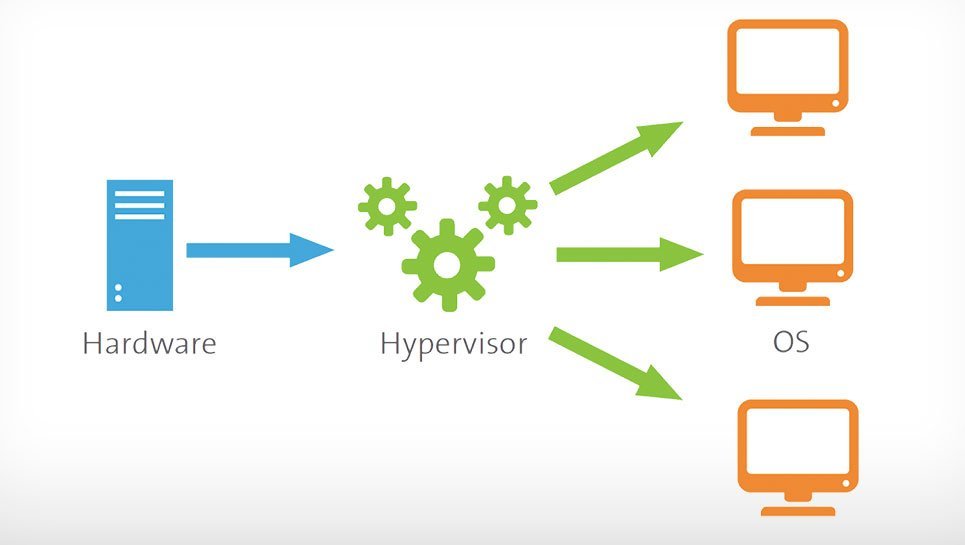
A hypervisor, also known as a virtual machine monitor, is software, firmware, or hardware that creates and manages virtual machines (VMs). By abstracting the underlying hardware, it allows each VM to run its own operating system and applications as though it had exclusive access to the physical resources. This abstraction is the cornerstone of cloud computing, where hundreds of VMs share a single server, and of DevOps practices that rely on disposable, reproducible environments.
Classifying Hypervisors: Type 1 vs Type 2
Hypervisors fall into two broad categories:
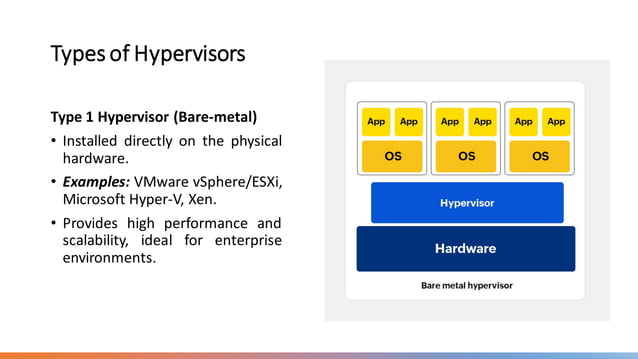
- Type 1 (Bare‑Metal) – runs directly on the host’s hardware, offering the most efficient resource use and strong isolation. Examples include VMware ESXi, Microsoft Hyper‑V, and KVM when configured with a dedicated kernel.
- Type 2 (Hosted) – runs on top of an operating system, making it easier to install and manage but adding an extra layer of overhead. Common choices are Oracle VirtualBox, VMware Workstation, and Parallels Desktop.
Choosing between the two often hinges on workload sensitivity, performance needs, and management complexity.
Key Features and Performance Considerations
Virtual Machine Isolation and Resource Allocation
Hypervisors must guarantee that one VM cannot interfere with another. This is achieved through CPU scheduling, memory paging, and network segmentation. Modern hypervisors support live migration—moving a running VM between hosts without downtime—an invaluable feature for high‑availability services.
Security Implications
Because the hypervisor sits above the OS layer, a breach could compromise all VMs on the host. Vendors therefore invest heavily in securing the hypervisor codebase, patching vulnerabilities, and implementing features like hardware‑enforced virtual machine introspection. Security best practices include keeping the hypervisor firmware up to date, limiting administrative access, and monitoring for anomalous behavior.
Common Use Cases Across Industries
Hypervisor technology underpins many of the services we take for granted:
- Cloud Providers – AWS, Azure, and Google Cloud run vast fleets of VMs on Type 1 hypervisors, scaling resources on demand.
- Enterprise Data Centers – businesses virtualize servers to maximize hardware utilization, reduce power consumption, and simplify patch management.
- Development Environments – developers use Type 2 hypervisors to experiment with different OS versions or to isolate applications from the host.
- Education and Research – universities deploy virtual labs where students can safely run multiple operating systems on a single machine.
Choosing the Right Hypervisor for Your Environment
Hardware Compatibility
Before adopting a hypervisor, verify that the host’s CPU supports virtualization extensions (Intel VT‑x or AMD-V). Some hypervisors also require specific firmware versions or BIOS settings. Incompatible hardware can lead to performance degradation or, worse, failure to boot virtual machines.
Vendor Support and Ecosystem
A strong ecosystem means access to tools for monitoring, backup, and automation. Enterprise‑grade hypervisors often come with proprietary management platforms that integrate with configuration management tools and SLA monitoring systems. Open‑source options like KVM benefit from community support and a vast array of add‑ons but may require more hands‑on configuration.
Future Trends in Hypervisor Technology
As workloads shift toward containerized microservices, hypervisors are evolving to blend the best of virtual machines and lightweight containers. Project Firecracker, for example, offers microVMs with a minimal hypervisor footprint, striking a balance between isolation and speed. Meanwhile, hardware vendors are pushing for tighter integration between processors and hypervisors, enabling features like Trusted Execution Environments that protect code even while it runs in a virtualized context.
Another emerging trend is the integration of machine learning for predictive resource allocation and automated remediation. Hypervisors may soon be able to forecast CPU spikes or memory pressure, reallocating resources in real time to keep services running smoothly.
FAQs About Hypervisor Technology
What is the difference between a hypervisor and a virtual machine? A hypervisor is the software that creates and manages virtual machines. The virtual machine itself is an isolated instance running its own operating system and applications.
Can I run a Windows VM on a Linux host? Yes. With a Type 1 or Type 2 hypervisor that supports Windows guests, you can run a Windows VM on a Linux host without any changes to the Windows installation.
How do I secure a hypervisor against potential exploits? Keep the hypervisor and its firmware updated, limit administrative access, isolate management traffic, and monitor for unusual CPU or memory usage patterns. Using hardware virtualization extensions can also provide an extra layer of protection.