Intel Core i5‑1240P: Performance and Features Explained
Performance and Features Explained
The Intel Core i5‑1240P is the newest middle‑tier offering in Intel’s 12th‑generation “Alder Lake‑P” line, aimed squarely at thin‑and‑light laptops that need a balance of speed, battery life, and modern capabilities. If you’ve been scrolling through spec sheets and wondering whether the “P” suffix signals a compromise, the short answer is: it’s a purposeful design for power‑efficient performance, not a downgrade.
Where the i5‑1240P Fits in Intel’s Roadmap
Intel’s 12th‑gen architecture introduced a hybrid layout that mixes high‑performance (P‑cores) with efficient (E‑cores). The i5‑1240P sits between the ultra‑low‑power i5‑1235U and the higher‑end i7‑1255U. Its TDP (thermal design power) is rated at 28 W (configurable up to 35 W), which gives OEMs enough headroom to push the chip in premium ultraportables while still keeping fan noise modest.
Key Specs at a Glance
- 12 cores (4 P‑cores + 8 E‑cores) / 16 threads
- Base clock: 1.7 GHz (P‑cores), 1.2 GHz (E‑cores)
- Turbo boost: up to 4.4 GHz (P‑cores), 3.3 GHz (E‑cores)
- Intel Iris Xe Graphics G7, up to 1.35 GHz
- Support for DDR5‑4800 and LPDDR5‑5200 memory
- Integrated Thunderbolt 4 and Wi‑Fi 6E
Hybrid Architecture: Performance + Efficiency Cores
The hallmark of the i5‑1240P is its 4 performance cores paired with 8 efficiency cores. In day‑to‑day tasks like web browsing or document editing, the OS leans on the E‑cores, which sip power and keep temperatures low. When you launch a demanding app—say, Photoshop or a modern game—the scheduler (aided by Intel Thread Director) quickly awakens the P‑cores, letting them sprint to 4.4 GHz. This dynamic hand‑off is why you’ll notice a laptop feel “snappy” on a quick‑click but still last through a long workday.
Real‑World Performance: Gaming, Productivity, and AI
Benchmarks from reputable tech sites show the i5‑1240P handling the latest titles at 1080p with medium settings, delivering around 45–50 FPS in games like Fortnite or Shadow of the Tomb Raider. It isn’t a dedicated gaming chip, but it’s more than capable for casual play.
For productivity, the extra E‑cores shine in multi‑threaded workloads—video encoding, 3D rendering, and running several VMs simultaneously. In Adobe Premiere Pro, the i5‑1240P often edges out the older i5‑1135G7 by 15‑20 % in render speed, thanks to the additional threads.
AI‑related tasks also benefit from Intel’s built‑in Gaussian & Neural Accelerator (GNA). Light on‑device inference, such as voice transcription or image upscaling, runs faster without needing a separate NPU.
Integrated Graphics and Media Capabilities
The Iris Xe G7 graphics core provides up to 96 execution units. While it can’t replace a discrete GPU for heavy AAA titles, it handles everyday multimedia with ease: 4K video playback at 60 fps, hardware‑accelerated AV1 decoding, and smooth HDR streaming.
For creators, the GPU supports DirectX 12 Ultimate, OpenCL 3.0, and Intel’s Quick Sync Video, cutting transcoding times dramatically. If you’re editing 1080p footage, expect near‑real‑time previews even without a separate graphics card.
Power Consumption and Thermal Design
The configurable TDP of 28 W gives OEMs flexibility. In a typical ultrabook, you’ll see the i5‑1240P drawing about 12–15 W during light browsing, extending battery life to roughly 10 hours on a 56 Wh pack. Under sustained load, power rises, but the chip’s efficient E‑cores keep the spike modest, often staying under the 35 W ceiling.
Thermal management is aided by Intel’s Adaptive Boost technology, which temporarily raises clock speeds when the cooling solution can handle the extra heat. In practice, this means you get a brief performance boost when you need it—like opening a large spreadsheet—without the system immediately throttling.
Security and Platform Features
Security isn’t an afterthought. The i5‑1240P integrates Intel’s latest hardware‑based mitigations:
- Intel Control‑Flow Enforcement Technology (CET) to stop control‑flow hijacking attacks.
- Intel Total Memory Encryption (TME) for data‑at‑rest protection on supported platforms.
- Hardware‑rooted Secure Boot and Platform Trust for firmware integrity.
Combined with Windows 11’s built‑in security stack, these features give a robust shield against common threats, which matters for professionals handling sensitive data on the go.
How It Stacks Up Against the i5‑1235U and i7‑1255U
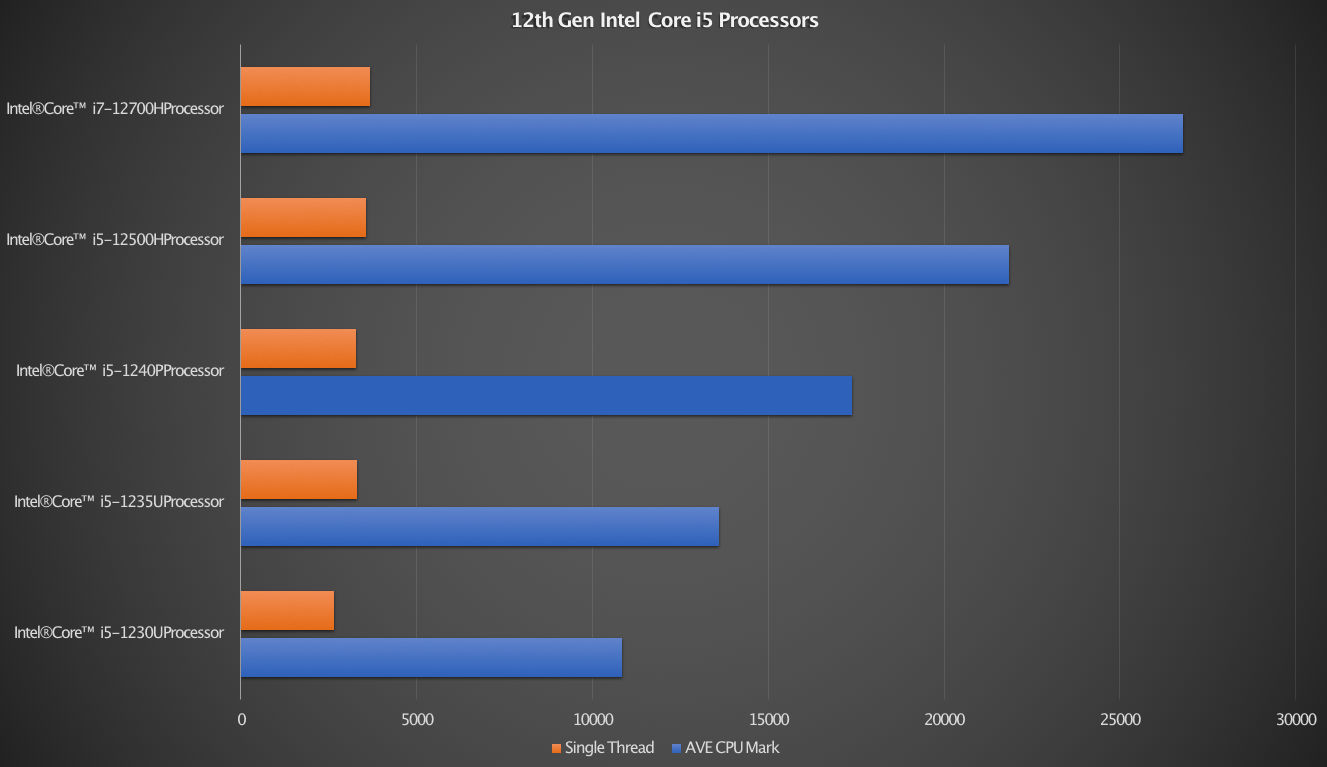
Compared to the i5‑1235U, the i5‑1240P gains two extra E‑cores and a higher turbo frequency, translating to roughly a 10‑15 % uplift in multi‑core benchmarks. Against the i7‑1255U, the gap narrows: the i7 adds two more P‑cores and higher cache, so it pulls ahead in heavy workloads, but the i5‑1240P still offers a compelling price‑to‑performance ratio for most users.
Should You Choose a Laptop with the i5‑1240P?
If you need a machine that can handle both creative tasks and everyday mobility, the i5‑1240P is a solid middle ground. It delivers respectable gaming performance, strong multi‑threaded productivity, and efficient battery life—attributes that make it a frequent pick for premium ultrabooks and 2‑in‑1 convertibles. For gamers seeking high frame rates at max settings, a laptop with a dedicated GPU would be wiser, but for most professionals and students, the i5‑1240P hits the sweet spot.
FAQs
- Q: Is the i5‑1240P suitable for casual gaming? Yes. Paired with the Iris Xe G7, it runs many popular titles at 1080p with smooth frame rates, though it won’t match a laptop with a discrete RTX or Radeon GPU.
- Q: Can the i5‑1240P handle video editing? Absolutely. With up to 12 cores and Intel Quick Sync, it accelerates 1080p and even 4K encoding, making it a practical choice for hobbyist editors.
- Q: How does battery life compare to older 11th‑gen chips? The hybrid design and lower base power draw generally give the i5‑1240P about 1–2 extra hours of runtime in typical office tasks, thanks to its efficiency cores.
- Q: Does the “P” suffix mean it lacks integrated graphics? No. “P” designates a mobile part with a 28 W TDP envelope; it still includes Iris Xe graphics, unlike the “G” series which may pair with a higher‑performance GPU.