Is the Otaku Games SCART Switch Worth the Hype?
If you still own a classic CRT TV or a modern display with a stubborn SCART port, you’ve probably heard about the Otaku Games SCART Switch. It promises to turn a cluttered cable jungle into a single tidy connection, letting you hop between a VCR, a handheld console, or an old computer without pulling the cords apart. The question is: does it live up to that promise, and is it a smart purchase for retro gaming enthusiasts?
What Is the Otaku Games SCART Switch?
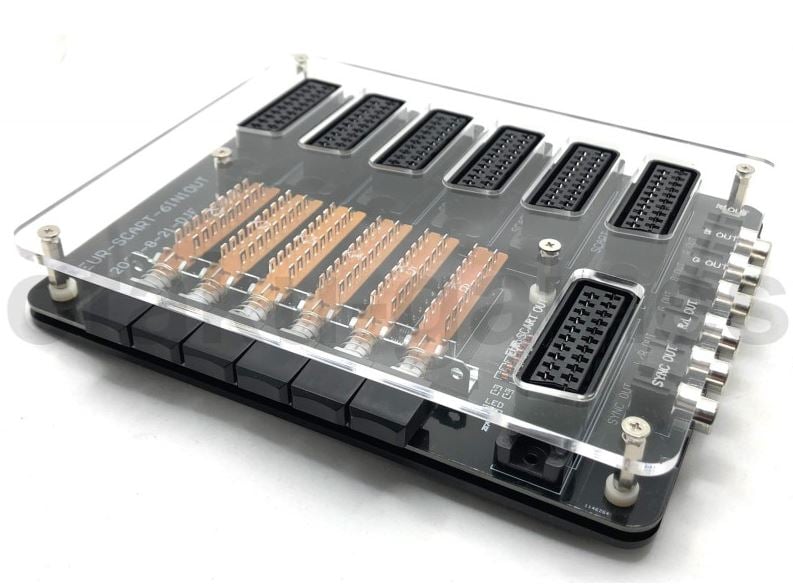
At its core, the device is a simple input‑to‑output adapter. It accepts up to three SCART signals—video and stereo audio—through its own connectors and routes them to one SCART jack on your television or projector. A small push button or toggle switch lets you choose which source is active at any time. Think of it as a miniature, analog switch‑board designed specifically for the European SCART standard.
Key Features
- Three input ports: Allows you to connect several legacy devices.
- Single output jack: One connection to your TV.
- Low‑profile design: Fits easily on a shelf or behind a monitor.
- Plug‑and‑play: No configuration software, no drivers.
- Built‑in audio support: Stereo audio comes through the same SCART cable.
Because it works entirely with analog signals, the unit offers no digital conversion or HDMI compatibility. It is purely a pass‑through device.
Why Might You Need It?
Many retro gamers still enjoy the tactile feel of a handheld console that runs on batteries or the nostalgic charm of a VHS library. However, modern TVs rarely have SCART inputs, forcing users to either buy an adapter or keep cables tangled. A SCART switch eliminates that hassle by letting you keep all cables plugged in while selecting the active source with a single button.
For households with multiple members, a SCART switch also saves space. Instead of juggling several SCART cables and a handful of adapters, you can centralise everything into one neat bundle.
Is the Device Worth the Money?
When evaluating a niche piece of hardware like the Otaku Games SCART Switch, consider the following criteria:
- Price point: Most units retail between $15 and $30. For the price, you’re getting a straightforward, reliable piece of equipment.
- Build quality: The switch features a solid plastic case with a matte finish. The connectors are rated for standard SCART use and have a mild spring that ensures a good mechanical connection.
- Performance: Because the unit simply routes signals, there is no compression or digital processing. Image quality remains that of the source—no loss, but no gain either.
- Durability: Users report that the switch holds up after years of repeated use, though a few reports mention occasional connector looseness after extended travel.
- Use cases: If you’re a serious retro gamer, you might already own a dedicated SCART‑to‑HDMI converter. In that case, the switch offers little extra value. For casual use—watching old cartoons or swapping between a VCR and a handheld—the switch shines by simplifying cable management.
In short, the switch is a solid investment if you have multiple analog devices that you want to keep wired and you’re tired of unplugging and re‑plugging cables.
Alternatives to Consider
Depending on your setup, you might find other solutions more fitting:
- SCART‑to‑HDMI converters: These give you digital output while preserving the analog signal. If your TV only accepts HDMI, a converter can be more useful.
- HDMI switchers: If you’ve already converted your legacy devices to HDMI, a multi‑port HDMI switcher eliminates the need for a separate SCART switch.
- Direct cable bundling: Some users prefer a simple cable tie or a small cable management box to keep SCART cables organized without the extra hardware.
Choosing the right device depends on how many legacy inputs you have, whether your TV offers SCART, and your budget.
Buying Tips
When purchasing an Otaku Games SCART Switch, keep these points in mind:
- Verify port count: If you plan to connect more than three devices, look for a larger switch.
- Check connector compatibility: Most switches accept standard 21‑pin SCART. Ensure your devices use the same variant.
- Read user reviews: Look for comments on long‑term stability and cable quality.
- Consider future proofing: If you’re planning to upgrade your TV, a converter might be a better long‑term solution.
With these considerations, you can make a purchase that truly fits your retro gaming workflow.
FAQ
- What does SCART stand for? SCART is an acronym for Système de Câblage à Réception Automatique Télévision, a European standard that combines video and audio signals into one 21‑pin cable.
- Does the switch support audio? Yes, the standard SCART audio path is preserved, so you’ll get stereo sound without any additional wiring.
- How many input sources can it handle? The Otaku Games model typically offers three inputs; if you need more, look for a four‑ or six‑port version.
- Is it compatible with my TV? If your TV has a SCART jack, the switch will work. If not, you’ll need an SCART‑to‑HDMI converter first.