Mastering NetSuite WMS: A Deep Dive into Specialized Features
If you are managing a complex supply chain, you know that standard order fulfillment processes often fall short. This is where specialized Warehouse Management Software (WMS) within NetSuite changes the game. It isn't just about storing inventory; it's about optimizing every movement from receipt to dispatch. For businesses scaling up, the transition from basic inventory management to a robust, specialized WMS is often the defining moment for operational efficiency.
NetSuite has evolved significantly in this space. The platform now offers advanced WMS capabilities that rival standalone systems, eliminating the need for costly integrations. But unlocking this potential requires more than just enabling features. It demands a strategic approach to configuration, workflow automation, and user adoption. In this article, we will explore the core components of specialized WMS in NetSuite, how to leverage them for maximum benefit, and why it matters for your bottom line.
Why Basic Inventory Management Is No Longer Enough
Many companies start with NetSuite’s basic inventory management features. Out of the box, you can track quantities, set reorder points, and manage simple bin locations. This works fine for small, low-velocity inventories. But as volume grows, the limitations become glaring. Without specialized WMS logic, warehouses often suffer from inefficiencies like overpacking, excessive travel time for pickers, and error-prone manual counting.
Specialized WMS in NetSuite addresses these pain points by introducing advanced functionalities such as slotting optimization, wave management, and advanced picking strategies. The goal is to reduce the "touchpoints" per order. Every time a human interacts with an item, there is a risk of error and a cost associated with labor. Specialized WMS aims to minimize these interactions through intelligent automation and guided workflows.
Core Features of Specialized NetSuite WMS
When we talk about "specialized" WMS capabilities in NetSuite, we are referring to a suite of tools designed to handle high-volume, complex fulfillment scenarios. Here are the key pillars:
- Advanced Shelf Location Management: Beyond simple bin IDs, this feature allows for detailed location tracking, including aisle, rack, and level. It supports both absolute and relative putaway strategies, ensuring items are stored where they are most accessible or secure based on their velocity and characteristics.
- Picking Optimization: This is perhaps the most critical feature. NetSuite WMS supports various picking methods, including discrete, batch, cluster, and wave picking. It generates pick lists that optimize the path through the warehouse, reducing travel time significantly.
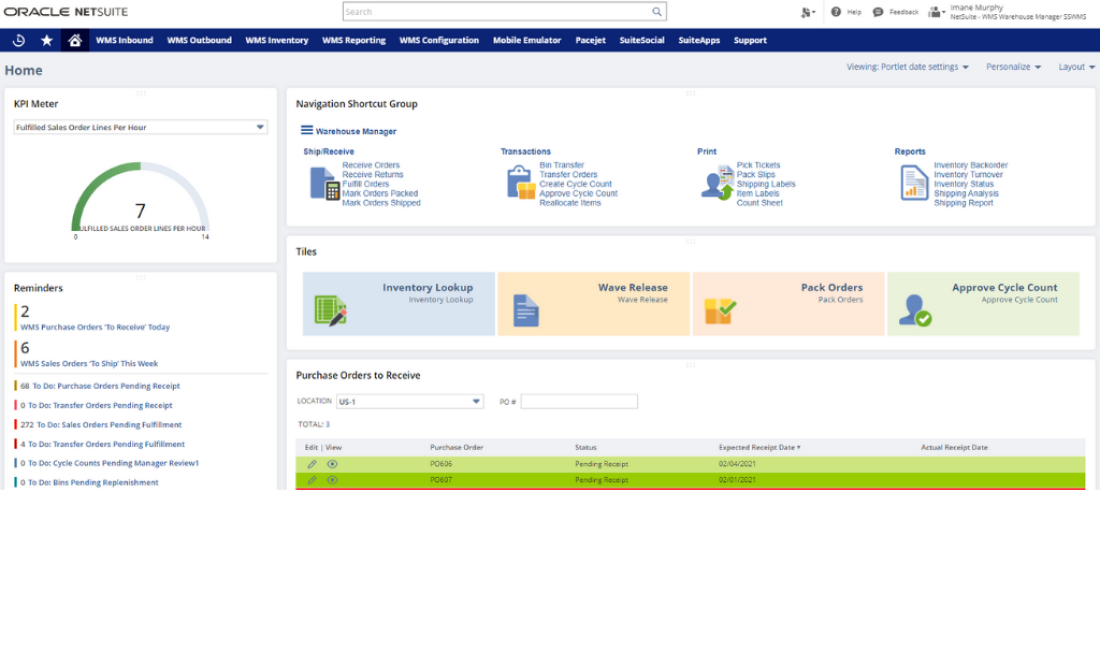
- Wave Management: Instead of fulfilling orders as they come in, wave management allows you to group orders based on specific criteria such as carrier, ship date, or destination. This batches similar orders together, streamlining the packing and shipping processes.
- Putaway Strategies: Intelligent putaway rules ensure that incoming goods are placed in the most efficient locations. For example, fast-moving items can be automatically assigned to locations closer to the packing station, while slower items are stored in less accessible areas.
Implementing Wave Management for Efficiency
Wave management is a powerful tool that many organizations underutilize. By grouping orders, you can synchronize your warehouse operations with your shipping carriers' pickup times. Imagine a scenario where you have fifty orders shipping via FedEx on a Tuesday morning. Without wave management, these orders might be scattered across the picking schedule, leading to inefficient packing and missed carrier cutoffs.
With specialized WMS, you can create a "wave" that includes all fifty FedEx orders. The system generates a single pick list for these orders, allowing pickers to gather all necessary items in one pass. Once picked, the items move to the packing station together, where they can be processed rapidly. This not only speeds up fulfillment but also reduces errors, as packers become focused on a single carrier’s documentation and labeling requirements.
However, implementing wave management requires careful planning. You need to define clear rules for what constitutes a wave. Should it be based on carrier? Geographic region? Service level? Getting this wrong can lead to bottlenecks. It’s essential to align your wave definitions with your actual operational constraints and business goals.
The Role of Mobile Computing in NetSuite WMS
No discussion of specialized WMS would be complete without mentioning mobile computing. NetSuite’s WMS features are designed to work seamlessly with mobile devices, such as handheld scanners or rugged tablets. This allows warehouse staff to receive, pick, pack, and ship items directly from the floor, eliminating the need for paper pick lists that can be lost or misinterpreted.
Using mobile devices ensures real-time data entry. When an item is picked, the system updates inventory levels immediately. This visibility is crucial for preventing overselling and ensuring accurate inventory counts. Moreover, the mobile interface can guide users through the correct picking path, highlighting the next location to visit. This reduces training time for new employees and minimizes errors caused by human guesswork.
For specialized workflows, mobile computing also supports cycle counting and quality control checks. Staff can perform counts on the go without disrupting ongoing operations. This integration of hardware and software is what transforms NetSuite from an ERP system into a comprehensive warehouse operations platform.
Best Practices for Maximizing Your WMS Investment
Having the technology is only half the battle. To truly benefit from specialized WMS in NetSuite, you need to adopt best practices that support its effective use. Here are a few recommendations:
First, invest in proper data cleanliness. Your WMS is only as good as the data it relies on. Ensure that item dimensions, weights, and handling instructions are accurately recorded. Inaccurate data can lead to inefficient packing and shipping costs.
Second, continuously optimize your slotting. Inventory dynamics change over time. Items that were slow-moving last year may be top sellers now. Regularly review your slotting strategies and adjust locations accordingly. NetSuite provides analytics that can help identify trends and suggest optimal placements.
Lastly, train your staff thoroughly. The best system in the world is ineffective if users don’t understand how to use it. Provide comprehensive training on the WMS features, especially the mobile interfaces. Encourage feedback from floor staff, as they often have insights into workflow inefficiencies that management might miss.
Conclusion
Specialized WMS in NetSuite offers a robust solution for businesses looking to scale their warehouse operations. By leveraging features like wave management, advanced picking, and mobile computing, you can significantly improve efficiency and accuracy. However, success depends on thoughtful implementation and ongoing optimization. If you are ready to move beyond basic inventory management, investing in these specialized capabilities could be the key to unlocking your warehouse’s full potential.
Frequently Asked Questions
Is specialized WMS included in all NetSuite editions?
Not necessarily. While basic inventory management is available in entry-level suites, specialized WMS features like wave management and advanced shelf location features are typically part of higher-tier bundles or require additional licenses. You should check with your NetSuite advisor to confirm what is included in your specific package.
How long does it take to implement specialized WMS?
Implementation timelines vary based on the complexity of your warehouse and the extent of customization required. For a standard setup, it might take a few weeks. However, if you need complex workflow automation or integration with specialized hardware, the process could take several months. Proper planning and data preparation are crucial to staying on schedule.
Can NetSuite WMS integrate with third-party logistics providers?
Yes, NetSuite offers robust integration capabilities. You can connect your WMS with third-party logistics (3PL) providers to synchronize inventory levels and fulfillment data. This ensures that whether inventory is held in your warehouse or a 3PL facility, it is visible and manageable through the same system.
What is the difference between basic and specialized WMS?
Basic WMS focuses on simple inventory tracking and basic pick/pack/ship processes. Specialized WMS adds layers of complexity and optimization, such as wave management, advanced slotting algorithms, and multi-depth shelving support. It is designed for high-volume environments where every second and movement counts, offering greater scalability and efficiency.