Navigating AWS Outages: Causes, Business Impact, and Resilience
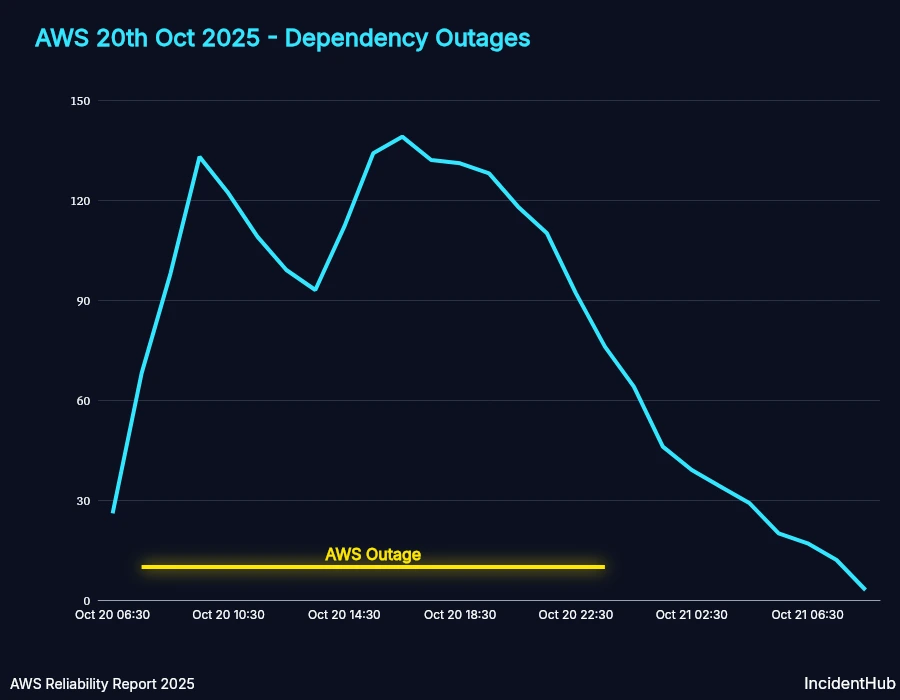
When the lights go out at Amazon Web Services, the digital world doesn’t just flicker; it stumbles. For years, the narrative was simple: AWS is rock-solid. Then came the cascading failures of 2021, followed by several high-profile disruptions in 2023 and 2024. Suddenly, the assumption of infinite uptime hit a wall of reality. If your business relies on the cloud, understanding AWS outages is no longer optional. It’s a survival skill.
The reality is stark. Even a system with 99.99% availability experiences minutes of downtime every year. For global platforms, those minutes translate to millions in lost revenue, eroded trust, and frantic engineering teams. We need to move past the notion that hyperscalers are immune to failure and start designing for resilience.
Why Does AWS Go Down?
It feels counterintuitive. How can the company that defined cloud reliability suffer such visible cracks? The answer usually lies in the sheer complexity of distributed systems. AWS manages billions of servers, networks, and data centers globally. The more components you have, the higher the probability of something breaking.
Most outages aren’t caused by solar flares or alien hackers. They stem from three primary sources:
- Human Error: This is the big one. A misconfigured script, a typo in a database migration, or an unintended change in network routing can ripple across thousands of machines. In 2021, a manual deletion of a critical network group triggered a massive outage.
- Software Glitches: Updates intended to improve performance or security can introduce bugs. If a new version of the underlying hypervisor has a memory leak, it can cause nodes to crash en masse.
- Infrastructure Failure: Power grid issues, fiber cuts, or extreme weather events can physically disconnect data centers. While rare, these physical threats are real.
Crucially, AWS uses a shared responsibility model. They own the *cloud* (hardware, networking, physical security). You own *in the cloud* (your code, data, and configurations). Unfortunately, when a foundational service like EC2 or S3 goes down, business operations stop regardless of how clean your code is.
The Business Cost of Downtime
The impact of an outage extends far beyond the technical logs. It hits the bottom line hard. For an e-commerce platform, every second of downtime is lost cart value. For a SaaS provider, it’s a breach of Service Level Agreements (SLAs).
But the hidden costs are often more damaging:
Crisis Management BurnWhen an outage strikes, your engineering team stops working on new features. They shift entirely to defensive mode: diagnosing, patching, and communicating. This context switching is expensive. It delays product roadmaps and burns out talent.
Reputation DamageTrust takes years to build and minutes to lose. Customers notice. If your app is slow or unavailable, they will find alternatives. In competitive markets, users have low tolerance for friction. A single major outage can trigger a churn wave that lasts for months.
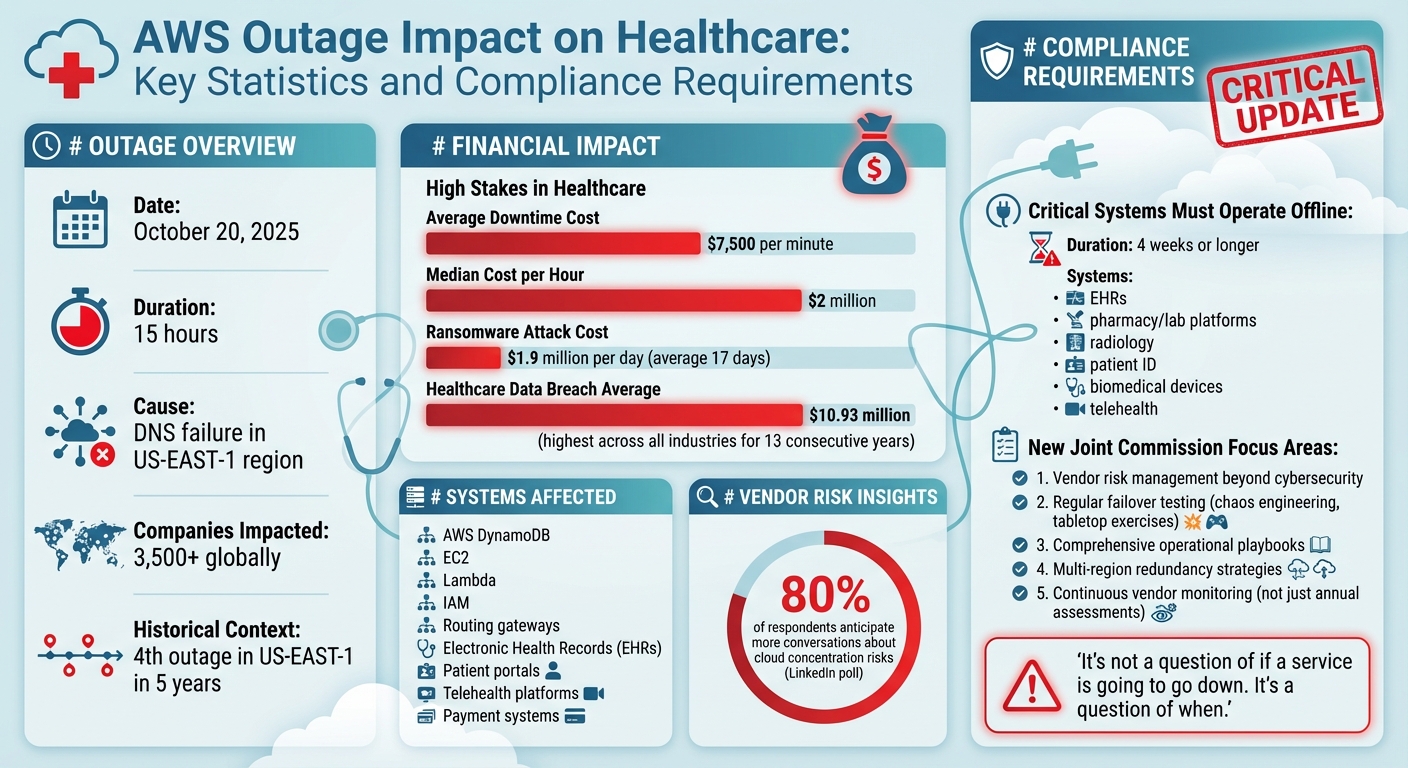
Regulatory RisksFor industries like healthcare or finance, prolonged outages can mean violations of compliance standards like HIPAA or GDPR. Data availability is a legal requirement, not just a technical feature.
Mitigation Strategies That Actually Work
You can’t control AWS infrastructure. You *can* control your architecture. The goal isn’t to predict outages, but to survive them. Here’s how mature organizations approach resilience.
Multi-AZ and Multi-Region Deployment
Availability Zones (AZs) are physically separate data centers within a region. They have independent power and cooling. Spreading your application across at least two AZs is the baseline for high availability. If one AZ loses power, the other keeps running.
For critical systems, go further: use multiple regions. Replicating data and services across different geographic areas (e.g., US East and US West) protects against regional disasters. Yes, it increases cost. But for many businesses, the insurance premium is worth avoiding total operational paralysis.
Embrace Chaos Engineering
Don’t wait for a real outage to test your systems. Chaos engineering involves intentionally injecting failure into your production environment. Tools like AWS Fault Injection Simulator (FIS) allow you to terminate instances, introduce latency, or disconnect networks during non-peak hours.
This sounds risky, but it’s safer than surprise failures. It reveals weak points in your failover logic before customers do. It answers the question: "Does our backup plan actually work, or is it just theory?"
Automate, Don’t Manual
Human reaction time is slow and error-prone during a crisis. Automate your recovery processes. Use Infrastructure as Code (IaC) tools like Terraform or AWS CloudFormation. If a region goes down, automated scripts should be able to shift traffic to a healthy region without requiring a human to type commands under pressure.
Also, implement comprehensive monitoring. Tools like AWS CloudWatch should alert you to anomalies *before* they become outages. High latency in a single AZ often precedes a wider failure. Catching these signals early allows for proactive mitigation.
FAQs About AWS Resilience
Q: How often does AWS actually go down?
A: Major, widespread outages are rare but do happen several times a year across the industry. Minor, localized disruptions occur more frequently. AWS publishes post-mortems for significant events, providing transparency into their frequency and root causes.
Q: Is using AWS still safer than an on-premise server?
A: Generally, yes. Managing your own physical servers involves risks of hardware failure, power loss, and cooling issues that AWS has professionally mitigated. However, you lose control over redundancy. You must architect your solution correctly within AWS to match on-premise reliability standards.
Q: What is the "Shared Responsibility Model"?
A: This is AWS’s framework where they are responsible for the security *of* the cloud (hardware, infrastructure), while you are responsible for security *in* the cloud (your data, access controls, application config). Understanding this division is key to knowing who fixes what during an incident.