Rescuing an iPhone After Water Damage: Your Ultimate Guide
Finding a splash of liquid on your iPhone is a heart‑stopping moment, especially when the screen lights up with a warning. Whether it was a spilled coffee, a sudden rain shower, or an accidental dunk, the clock starts ticking the instant moisture meets the circuitry. This guide walks you through the science behind the damage, the fastest actions you can take, and the point where professional help becomes essential.
Understanding iPhone Water Damage
iPhones are built with water‑resistant seals, but those defenses have limits. Modern models carry an IP rating—usually IP67 or IP68—which tells you how deep and how long the device can survive under water. Exceeding those parameters, or exposing the phone to conductive liquids like saltwater or sugary drinks, can short‑circuit the tiny connectors and corrode internal components within minutes.
Why the Damage Happens So Quickly
Water is a surprisingly good conductor, especially when it contains minerals or sugars. When it seeps through the speaker grilles or charging port, it can bridge the gap between the logic board’s delicate pathways, creating a temporary short. The resulting surge often triggers the protective circuits, but not before a few nanoseconds of unintended current have already begun to degrade the copper traces.
Temperature also plays a role. A hot beverage not only brings liquid but also heat, which expands the metal and can pry open seals that were otherwise tight. Conversely, cold water can cause condensation inside the device, adding another layer of moisture that’s harder to notice at first glance.
Immediate Steps to Minimize Harm
- Power off immediately. Holding the side button until the device shuts down prevents electrical activity while it’s wet.
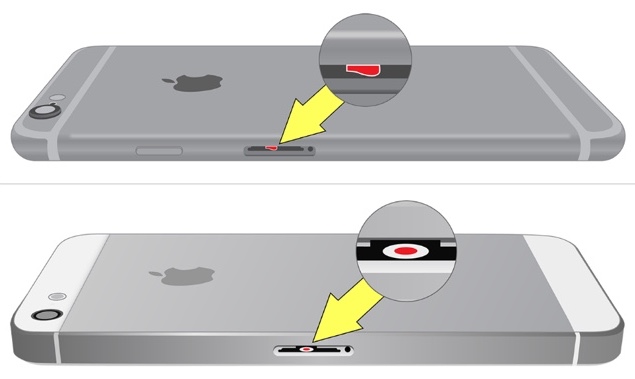
- Remove any accessories. Take off the case, unplug cables, and detach the SIM card tray if possible.
- Blot, don’t shake. Gently pat the exterior with a lint‑free cloth to soak up excess liquid; shaking can push water deeper.
- Avoid heat sources. Do not use a hair dryer or place the phone in direct sunlight. Excessive heat can warp the glass and damage the battery.
- Use a suction method. If you have a small, low‑pressure vacuum (like a camera lens blower without the heat), you can coax water out of ports without forcing it further in.
These actions buy you precious minutes while the internal moisture begins to evaporate on its own.
Do‑It‑Yourself Drying Methods That Actually Work
After the initial emergency steps, the goal is to get the device as dry as possible without resorting to myths like “rice baths,” which are largely ineffective and can introduce dust.
- Leave it in a dry, well‑ventilated area. A tabletop near a fan works better than a sealed bag. Air circulation speeds evaporation.
- Use silica gel packets. If you have a few of those little desiccant packets that come with shoes or electronics, arrange them around the phone in a shallow container. They absorb moisture more efficiently than rice.
- Consider a professional‑grade drying chamber. Some repair shops have low‑humidity chambers that gently pull moisture out. If you can borrow one, it’s a safe middle ground between DIY and full service.
Patience is key. Most experts recommend waiting at least 24 hours before attempting to power the device again, and up to 48 hours for severe exposure.
When to Seek Professional Help
If the phone doesn’t respond after a full drying period, or if you notice any of the following, it’s time to hand it over to a technician:
- Flickering or dim display, even after a restart.
- Unusual noises from the speaker or microphone.
- Corrosion visible on the charging port or under the screen (often a greenish residue).
- The battery drains unusually fast, indicating possible internal shorting.
A reputable repair service can disassemble the iPhone, clean the logic board with isopropyl alcohol, and replace any damaged components. While this isn’t cheap, it’s often far less costly than buying a brand‑new model.
Preventing Future Mishaps
Even the most careful user can be caught off guard. Here are a few habits that dramatically lower the odds of a repeat incident:
- Use a waterproof case. Brands like OtterBox and LifeProof provide genuine IP‑rating protection, not just a snug fit.
- Keep liquids away from the work zone. A simple coaster or a separate charging station can keep coffee cups out of reach.
- Invest in a wireless charger. Without a cable plugged into the port, you eliminate one of the most common entry points for spills.
- Regularly back up. A nightly iCloud or local backup ensures that even if the worst happens, your data stays safe.
These preventive steps add a layer of peace of mind without sacrificing convenience.
FAQ
Can I use a hair dryer on low heat to dry my iPhone?
Generally no. Even low heat can cause the adhesive that holds the screen in place to weaken, and the sudden temperature change may crack the glass. A fan or natural airflow is a safer option.
Is it safe to put my iPhone in a zip‑top bag with uncooked rice?
Rice is a poor desiccant and can leave starch particles inside the ports. It’s better to use silica gel or let the phone air‑dry in a low‑humidity environment.
Will opening the iPhone myself void the warranty?
Yes, Apple’s warranty typically becomes void once the device is opened by an unauthenticated party. If your phone is still under warranty, it’s wiser to take it to an Apple Store or authorized service provider.
How long does it usually take for water‑damaged iPhones to recover?
If the exposure was mild (e.g., a splash), 24 hours of drying may be enough. For submersion or sugary liquids, expect 48 hours or more, and consider professional cleaning.