Semantic Scholar vs Google Scholar: Which Is Better?
When you need to locate a research paper, track citations, or simply stay on top of the latest findings, two names dominate the conversation: Semantic Scholar and Google Scholar. Both are free, both index millions of scholarly works, but they were built with different philosophies in mind. Understanding those philosophies helps you decide which tool aligns with your workflow, whether you’re a graduate student drafting a literature review or a seasoned researcher hunting for obscure conference proceedings.
Semantic Scholar vs Google Scholar: Direct Feature Comparison
Semantic Scholar, a project of the Allen Institute for AI, emphasizes AI‑driven relevance ranking. Its algorithms attempt to surface papers that are not only highly cited but also semantically related to your query. Google Scholar, on the other hand, leans on Google’s massive web‑crawling infrastructure and the classic PageRank‑style signal that favors citation counts and link popularity. The result is a subtle but real difference in how each platform surfaces “important” papers.
Depth and Breadth of Content Coverage
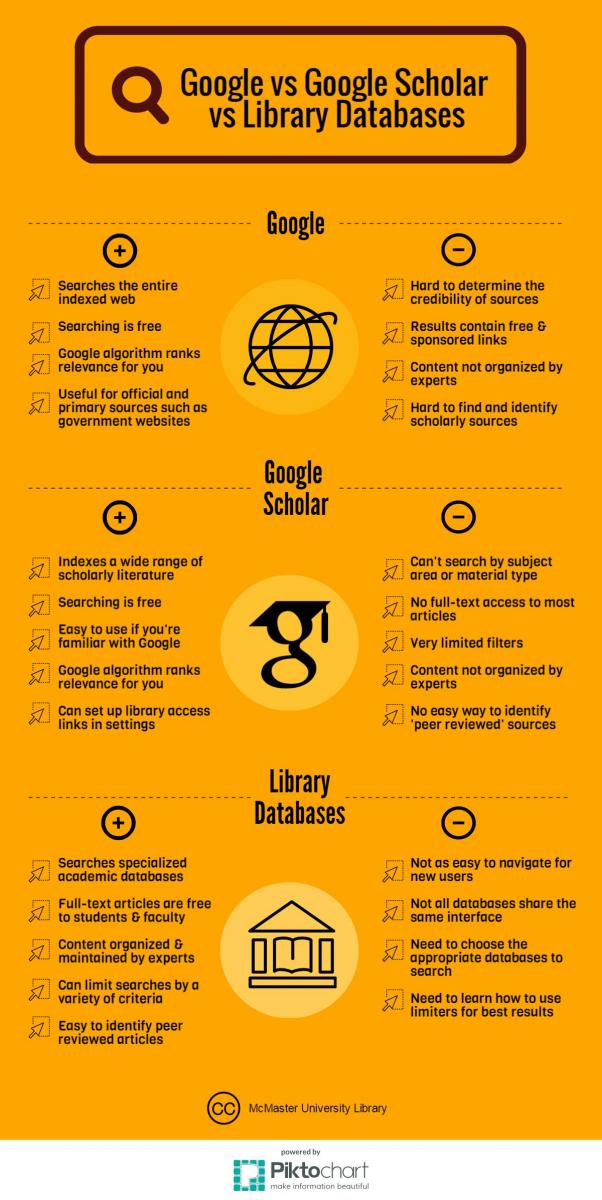
Google Scholar casts a very wide net, indexing everything from pre‑prints on arXiv to book chapters and even patents. Its inclusivity means you’ll often find a citation that other databases miss, especially for interdisciplinary topics. Semantic Scholar is more selective; it focuses primarily on peer‑reviewed articles in the sciences and engineering, though it has expanded into the social sciences and humanities. This narrower focus can translate into cleaner result sets, but you might need to fall back on Google Scholar for gray literature.
Search Engine Design and Result Ranking
Semantic Scholar’s “Semantic” tag is not just a buzzword. The platform uses natural‑language processing to understand the context of your query, pulling in related concepts and even highlighting influential sections within a paper. Google Scholar’s ranking, while powerful, often privileges older, heavily cited works, which can be a double‑edged sword when you’re searching for cutting‑edge research. In practice, many users report that Semantic Scholar surfaces newer, highly relevant articles that Google Scholar sometimes buries under classic citations.
User Experience and Interface
The visual design of Semantic Scholar feels more modern: clean typography, collapsible abstracts, and handy “Key Figures” thumbnails that preview important graphs. Google Scholar sticks to a minimalist, utilitarian layout that many researchers appreciate for its speed and low bandwidth usage. However, Google Scholar’s lack of advanced filters—such as limiting results by methodology or funding source—can make deep dives feel a bit cumbersome compared with Semantic Scholar’s facet filters.
Citation Tools and Export Options
Both platforms let you export citations in BibTeX, EndNote, and RIS formats, but Semantic Scholar goes a step further with a one‑click “Copy Citation” button that includes a DOI link and a short abstract preview. Google Scholar offers a “Cite” pop‑up that lists common styles, yet it sometimes omits newer metadata like ORCID IDs. If you rely heavily on reference managers, the slightly richer export package from Semantic Scholar might save a few minutes per article.
Integration with Other Platforms
Semantic Scholar integrates directly with the Microsoft Academic Graph and offers an API that developers can use to embed search functionality into custom tools. Google Scholar does not provide a public API, limiting its usefulness for automated workflows. Conversely, Google Scholar’s tight coupling with Google Docs and Google Drive means you can insert citations on the fly without leaving the document, a convenience that many students find hard to ignore.
Privacy, Ads, and Commercial Considerations
Google Scholar displays occasional ads and tracks user activity through Google’s broader ecosystem, which some privacy‑concerned users find unsettling. Semantic Scholar, while still collecting usage data for research purposes, does not serve ads and is transparent about its data‑handling policies. If a clean, ad‑free experience is a priority, Semantic Scholar currently has the edge.
Which Platform Fits Your Workflow?
If your research demands the most exhaustive coverage—including theses, patents, and non‑English sources—Google Scholar remains the go‑to choice. Its sheer breadth and seamless tie‑ins with Google’s productivity suite make it a reliable fallback for any scholar. On the other hand, if you value AI‑enhanced relevance, clearer abstracts, and a smoother export experience, Semantic Scholar often feels more curated and efficient. Many researchers adopt a hybrid approach: start with Google Scholar for a broad sweep, then switch to Semantic Scholar to drill down into the most pertinent, up‑to‑date papers.
FAQ
- Can I export citations from Semantic Scholar directly into reference managers? Yes, the platform supports BibTeX, EndNote, and RIS exports, and the “Copy Citation” button includes DOI and abstract snippets for quick import.
- Is Google Scholar free for all users? Google Scholar is freely accessible without a subscription, though you need a Google account to use some features like “My library.”
- Does Semantic Scholar provide full‑text PDFs? When a publisher makes the PDF openly available, Semantic Scholar links to it; otherwise, it may only show the abstract and citation details.
- Are there any mobile apps for these services? Google Scholar can be accessed through any mobile browser, while Semantic Scholar offers a dedicated iOS and Android app that mirrors the desktop experience.
.jpg)