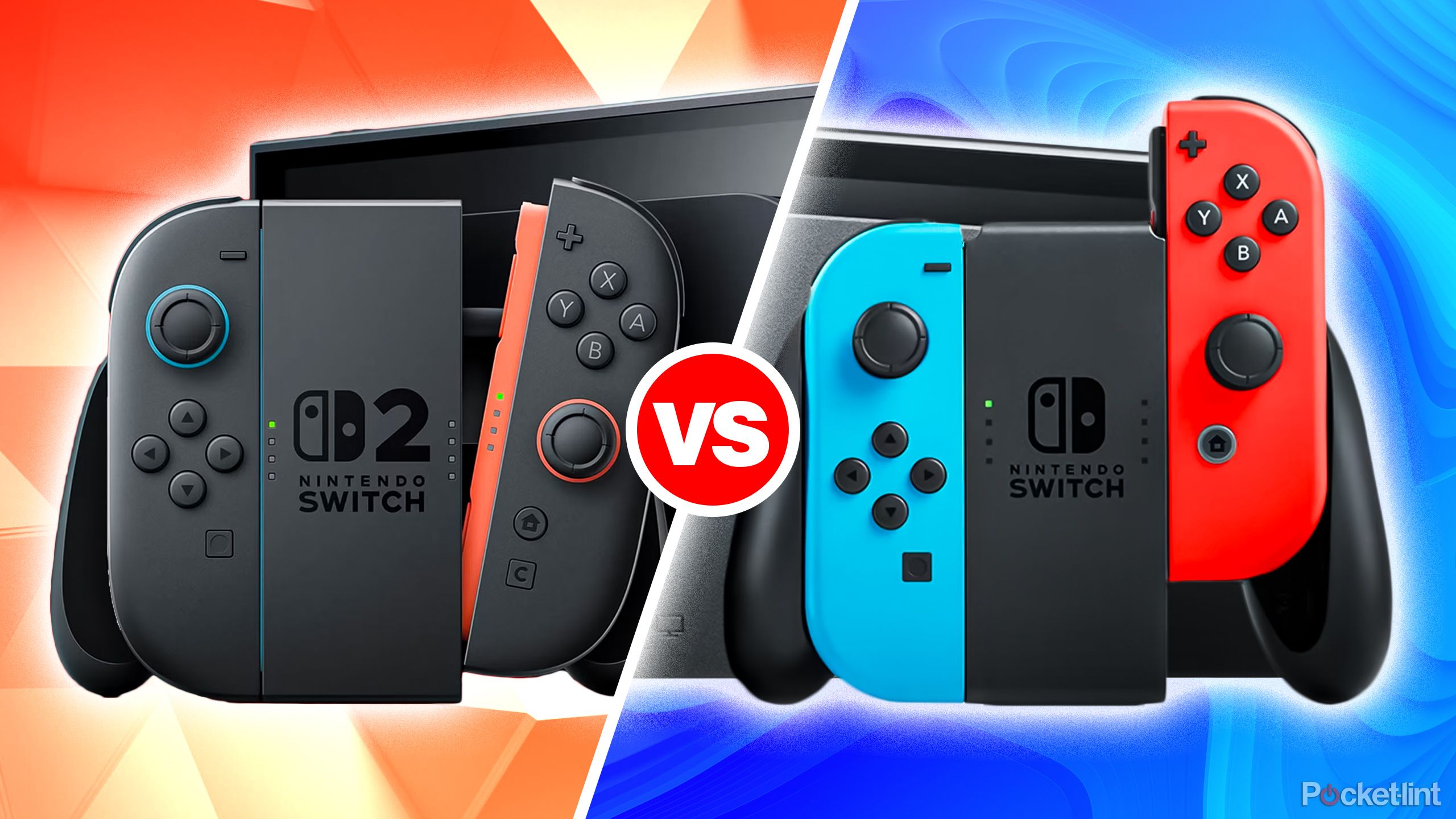
Switch 2 vs Switch 1: How Backward Compatibility Works
What “backward compatibility” actually means for the Switch family
The term sounds tech‑savvy, but at its core it’s simple: games made for the original Nintendo Switch should run on the newer console without needing a remake or patch. For players, this translates into a seamless library transition—your favorite titles stay playable, and the value of your collection doesn’t evaporate when you upgrade.
Historically, Nintendo has kept its handheld and hybrid lines compatible. The Switch Lite, for instance, runs the same software as the original model, albeit without detachable Joy‑Cons. That precedent suggests the company is likely to adopt a similar approach with the upcoming Switch 2, though the exact technical path may differ.
Hardware shifts that could affect game compatibility
Switch 2 is rumored to feature a faster processor, higher‑resolution display, and improved battery life. Those upgrades are great for new titles, but they also raise questions about how older games will behave on the new architecture.
- CPU/GPU changes: If the new chip uses a different instruction set, Nintendo may employ a software layer—essentially an emulator—to translate Switch 1 code. This adds a tiny performance overhead, but most games are lightweight enough that players likely won’t notice.
- Screen size and aspect ratio: The original Switch’s 720p handheld mode scales to a 6.2‑inch screen, while Switch 2 is expected to sport a 7‑inch OLED panel at 1080p. Games designed for the smaller display will be upscaled, sometimes revealing texture stretching, but the core gameplay remains unchanged.
- Controller layout: Joy‑Cons will retain their classic shape, so button mapping stays familiar. Any new features—like enhanced haptics—are optional add‑ons that older titles simply ignore.
Playing Switch 1 games on Switch 2: What works and what doesn’t
In practice, most first‑party Nintendo releases—from Breath of the Wild to Mario Kart 8 Deluxe—are expected to launch without hiccups. The console’s operating system will detect the game’s metadata and apply the appropriate compatibility mode.
Third‑party indie titles sometimes rely on specific libraries or older SDKs. If those libraries aren’t bundled into the new OS, a developer patch may be required. However, Nintendo’s track record shows they usually provide a compatibility shim to avoid forcing players into a “buy‑again” scenario.
One edge case involves games that used the Switch’s built‑in NFC for Amiibo. If Switch 2 modifies the NFC antenna’s firmware, the console may prompt a quick firmware update to keep those features functional.
Saving progress and cloud saves across generations
Saved data lives in two places: locally on the console’s internal storage and in Nintendo’s cloud service (if you subscribe to Nintendo Switch Online). When you power on a Switch 2 for the first time, it will prompt you to link your Nintendo Account. Once linked, the system automatically syncs cloud saves, letting you pick up right where you left off on the original hardware.
For players who prefer local saves, the new console supports a migration tool that copies the entire user profile from a Switch 1 via a USB‑C cable or a local Wi‑Fi transfer. The process encrypts the data, so you won’t lose any progress even if the original console is retired.
Tips for a smooth transition to Switch 2
- Back up your cloud saves: Even if you already use Nintendo Switch Online, double‑check that recent progress has uploaded before swapping hardware.
- Keep your old console handy: Some games may receive post‑launch patches that only run on the original firmware. Having the Switch 1 around ensures you can still access those updates.
- Check the eShop: A quick glance at the “My Games & Apps” section will flag any titles that need a compatibility patch. Nintendo typically highlights these with a small “Update Available” badge.
- Test performance: Play a graphically intensive game like The Legend of Zelda: Tears of the Kingdom on both consoles. Notice any frame‑rate differences and decide whether you need the extra power of Switch 2 for that experience.
Frequently Asked Questions
Will every Switch 1 game run on Switch 2?
Most will, especially first‑party titles. A handful of niche third‑party games might need a developer‑issued update, but Nintendo’s compatibility layer usually handles the majority without user intervention.
Do I need to repurchase games on the eShop?
No. Your existing digital licenses are tied to your Nintendo Account, not the hardware. Once you sign in on Switch 2, the eShop will recognize your purchases automatically.
Can I transfer physical cartridge games?
Absolutely. The cartridge slot is unchanged, so you can pop a Switch 1 game into Switch 2 and play it directly. The console will treat it like any other title.
Will my saved data transfer without a Nintendo Switch Online subscription?
Yes, but you’ll need to use the local transfer tool. Cloud saves are a convenience, not a requirement, for moving data between consoles.