TV PSI Explained: Measuring Signal Strength and Quality
When you tweak the dial on your old CRT or tap the antenna on a new flat‑screen, you’re essentially hunting for the best TV PSI readings. PSI, or “Peak Signal Intensity,” gives you a quick snapshot of how strong and clean the broadcast is. But understanding the numbers and what they really mean can feel like decoding a secret language. This guide breaks down the basics of TV PSI, why it matters, and how to use it to get the sharpest picture possible.
TV PSI: Understanding Signal Strength and Quality
At its core, PSI measures the voltage of the incoming carrier wave. A higher PSI means the signal is stronger, which usually translates to fewer freezes or noise. Yet PSI alone doesn’t capture distortion, bit‑error rates, or interference—factors that can ruin a clear picture even when PSI looks good. Think of PSI as the power source and picture quality as the final performance.
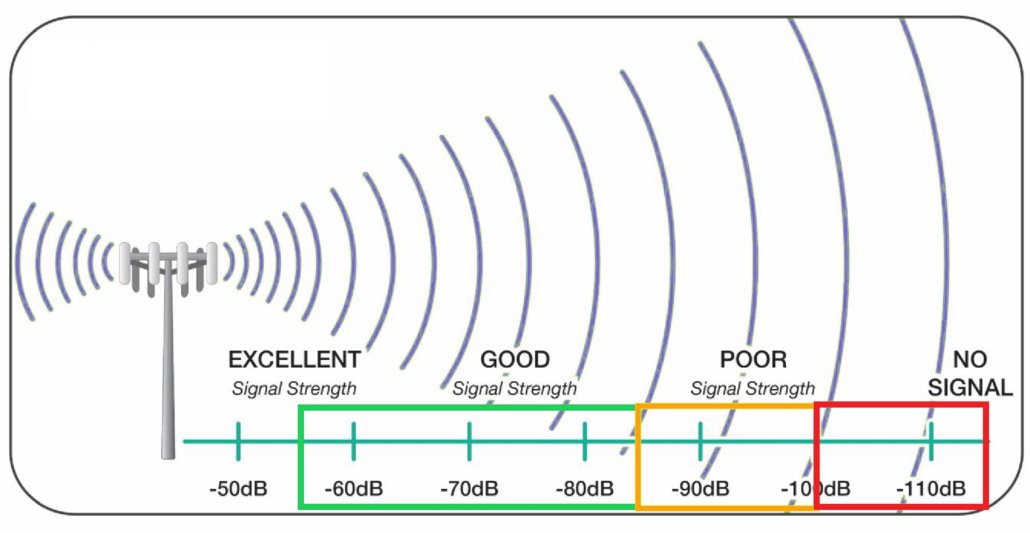
What PSI Values Typically Look Like
- Below 10 dB – Weak signal; frequent drop‑outs.
- 10–30 dB – Moderate; might need a better antenna or coaxial cable.
- 30–50 dB – Good; most households find this range reliable.
- Above 50 dB – Excellent; minimal chances of reception problems.
Remember, these ranges can vary with equipment and local geography. A rural viewer might be content with 25 dB, while an urban user expects 45 dB or higher.
Beyond PSI: The Role of Signal Quality
Signal quality is a composite of several metrics: signal‑to‑noise ratio (SNR), bit error rate (BER), and line noise. Even a high PSI can mask a low SNR, causing a washed‑out picture or “snow.” Likewise, a low PSI with a clean SNR might still deliver acceptable detail if the signal is well‑filtered.
Common Factors That Reduce Quality
- Coaxial Cable Damage – Old or frayed cables introduce loss.
- Electromagnetic Interference – Nearby routers, microwaves, or power lines.
- Antenna Misalignment – Even a few degrees can halve the received power.
- Weather Conditions – Rain, snow, and atmospheric turbulence can scatter signals.
Diagnosing quality issues often starts with a PSI check, then a visual inspection of cables and antenna positioning.
How to Measure PSI and Quality on Your TV
Most modern set‑top boxes and digital TVs include a diagnostics menu. Here’s a quick step‑by‑step:
- Enter the Service Menu – Usually a combination like
1-9-1-3-9on the remote. - Navigate to Signal Information – Look for “Signal Strength,” “Signal Quality,” or “PSI.”
- Read the PSI Value – Note the dB number.
- Check Quality Bars – Many boxes display a bar graph; a full bar means good quality.
On some TVs, you can also view live PSI data via a channel info overlay. If your device lacks this feature, a cheap external tuner or a smartphone app that reads antenna metrics can fill the gap.
When PSI Falls Short: Practical Tips for Better Reception
Below are actionable steps that address both low PSI and subpar quality without breaking the bank.
Upgrade Your Antenna
Directional antennas can focus energy toward a specific transmitter, boosting PSI by up to 10 dB. If you’re far from the tower, consider a high‑gain, low‑loss model. Always use a weather‑proof housing to avoid corrosion.
Replace or Shorten Coaxial Cables
Use RG6 cable, which offers better shielding than the older RG59. If your run is over 100 feet, consider a signal amplifier, but place it as close to the antenna as possible to avoid adding noise.
Check and Re‑install Connectors
Loose or corroded connectors can drop PSI dramatically. Tighten every screw and replace any with visible damage. A clean, secure connection often improves quality more than a new antenna.
Use a Signal Conditioner
A signal conditioner sits between the antenna and the tuner, filtering out interference and smoothing out spikes. They’re especially handy in urban areas with heavy electromagnetic noise.
Why PSI Matters When Switching Between Analog and Digital
Analog signals rely heavily on PSI; a small dip can turn a clear picture into a blur. Digital signals, on the other hand, are more forgiving up to a point. Digital can recover from a drop in PSI by reallocating bits, but once PSI falls below a threshold (often around 15–20 dB), the receiver will start dropping packets, leading to pixelation or complete loss. Thus, while PSI is still a key indicator, digital TVs also use error‑correction codes to mask weaker signals.
Future-Proofing: Upcoming Broadcast Technologies
High‑definition broadcasts and HDR content demand not just high PSI but also high SNR and low BER. With the advent of ATSC 3.0 (also known as “NextGen TV”), signal strength will be more important than ever because the new standard packs more data per carrier. If you’re planning a TV upgrade, check that your antenna and cables support the higher frequencies and bandwidths of the next generation.
Checklist Before You Upgrade
- Is your antenna rated for ATSC 3.0 frequencies?
- Do you have RG6 coaxial cable with low loss?
- Is your tuner capable of decoding HDR streams?
- Have you tested PSI across multiple channels?
Answering these questions helps ensure a smooth transition to next‑generation broadcasts.
FAQ
- Q: Can a high PSI guarantee a perfect picture?A: Not always. PSI tells you power, but quality depends on noise and interference. Pair high PSI with a clean SNR for best results.
- Q: Why does my picture get noisy even when PSI looks good?A: Likely electromagnetic interference or a faulty cable. Check for nearby devices and replace cables if needed.
- Q: Is an amplifier always the solution for low PSI?A: Amplifiers boost signal but can also amplify noise. Use them only after ensuring your antenna and
![DStv Signal Strength Settings [How to adjust signal?]](https://imveloawards.co.za/wp-content/uploads/2021/05/79.jpg)