Understanding What www.example.com Reveals About Domain Names
When you type www.example.com into a browser, you’re seeing a tiny piece of internet infrastructure that most people never stop to examine. So, what is www.example.com and how does it illustrate the way domain names operate? In this article we’ll peel back the layers—from the meaning of “www” to the role of the .com suffix—so you can grasp why that string matters beyond being a placeholder.
What Is www.example.com? Exploring the Basics
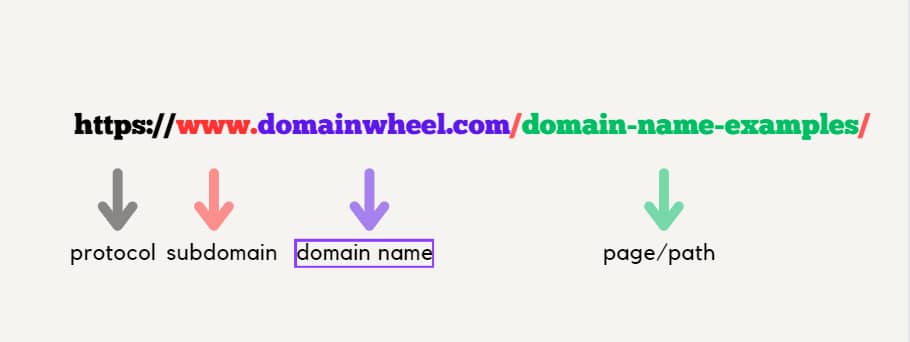
The address www.example.com is a fully qualified domain name (FQDN). It consists of three parts: the subdomain “www”, the second‑level domain “example”, and the top‑level domain (TLD) “.com”. Together they point to an IP address that tells your computer where to fetch the website’s files. Though “example.com” is reserved for documentation and teaching, the structure mirrors that of any commercial site.
The Role of “www” and Subdomains
Historically, “www” stood for “World Wide Web” and signaled that the host served web content. Modern sites often drop it, but the subdomain still exists in DNS records and can be redirected to the root domain. Subdomains let owners create separate sections—like blog.example.com—without buying new domain names.
How Domain Names Work Behind the Scenes
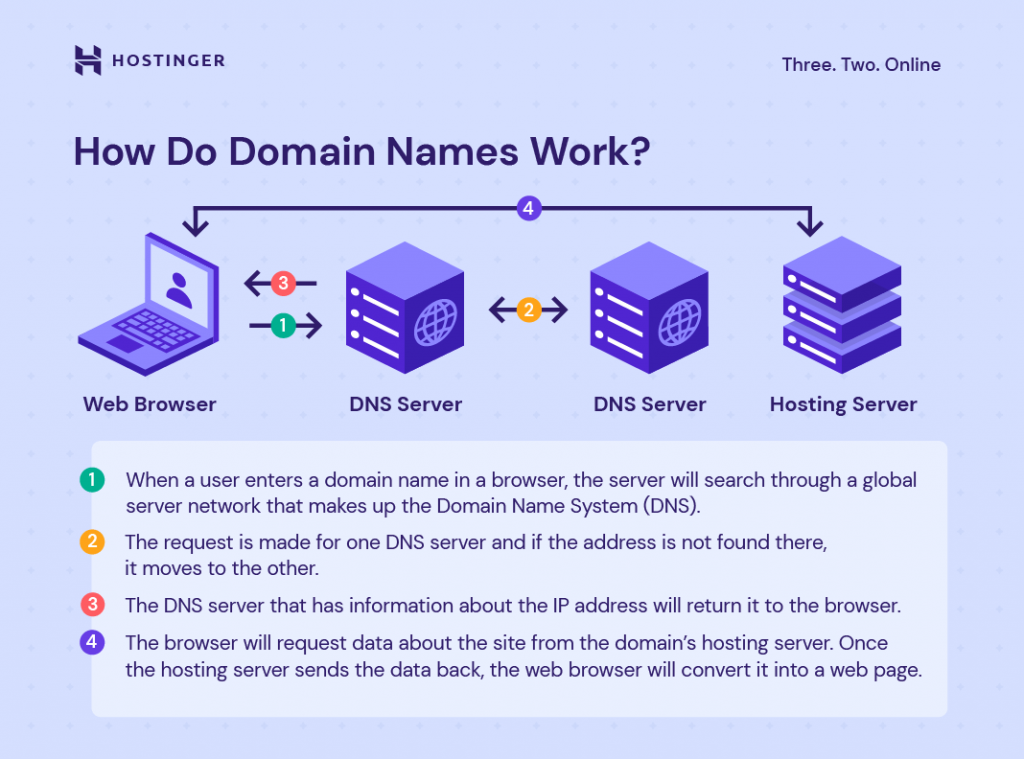
When you hit Enter, your computer asks a recursive DNS resolver to translate www.example.com into a numeric address. The resolver queries the root servers, which point to the .com TLD servers, which finally hand back the authoritative name server for “example.com”. That server returns the IP address associated with the “www” host record.
- Registration: An individual or organization registers “example.com” through an accredited registrar, paying an annual fee.
- DNS Records: Common records include A (IPv4 address), AAAA (IPv6), CNAME (alias), and MX (mail exchanger).
- Propagation: Changes to DNS can take minutes to 48 hours to spread across the global resolver network.
All of this happens in the background, usually in less than a second, making the process feel instantaneous to the user.
Why Example.com Is Used as a Placeholder
The domain “example.com” (and its siblings “example.org” and “example.net”) is reserved by the Internet Engineering Task Force (IETF) in RFC 2606. The standard designates these names for documentation, sample code, and tutorials, ensuring that no real business is inadvertently affected by stray references.
Because the name is guaranteed to resolve to a harmless site—often a simple page explaining its placeholder status—it provides a safe sandbox for developers, educators, and writers. Using “example.com” also avoids legal complications that could arise from using an active commercial domain in public examples.
Common Misconceptions About Domain Names
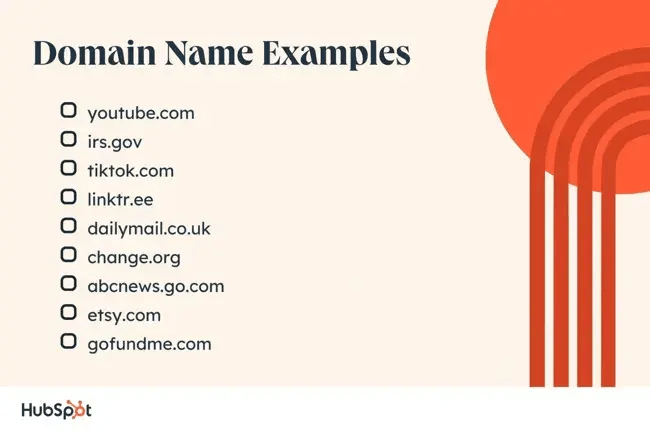
Many newcomers assume that a domain name is the same as an IP address. In reality, the domain is merely a human‑readable label that maps to an IP via DNS. Another frequent myth is that “.com” always indicates a commercial entity; the TLD is now open to anyone, and the content can be anything from a personal blog to a government portal.
People also think that once a domain is registered, it’s immutable. Actually, owners can update DNS records, change hosting providers, or even transfer the domain to a different registrar without altering the visible URL—provided the new settings point to the same FQDN.
Practical Tips for Choosing a Good Domain Name
If you’re planning to launch your own site, keep these pointers in mind:
- Prefer short, memorable names that avoid hyphens and numbers.
- Check trademark databases to avoid legal disputes.
- Consider buying common misspellings or alternative TLDs to protect your brand.
- Set up a reliable DNS provider with good uptime and security features.
Even though “example.com” is not available for commercial use, the lessons it teaches about structure, reservation, and safety apply to any domain you might register.
FAQs
Q: Does “www” have any technical advantage today?
A: Not really. Modern browsers and servers treat “www.example.com” and “example.com” the same if the DNS records point to the same IP. The subdomain persists mainly for legacy compatibility and organizational clarity.
Q: Can I use “example.com” for my own website?
A: No. The IETF reserves “example.com” for documentation, so it should never be used for commercial or personal sites. Violating this convention could lead to confusion or legal issues.
Q: How often should I update my DNS records?
A: Only when you change hosting providers, add new services (like email), or need to implement security measures such as DNSSEC. Unnecessary changes can cause propagation delays and temporary downtime.