Why Your Samsung Dryer Won’t Dry and How to Fix It
There’s nothing more frustrating than loading a full batch of laundry into a Samsung dryer, hitting “Start,” and watching the drum spin forever without a single dry shirt in sight. Before you start Googling replacement units, take a moment to run through the most common culprits. Most of the time, the problem is something you can diagnose and repair without calling a technician.
Start with the Simple Stuff
Even the most sophisticated dryer can be tripped up by basic oversights.
- Lint filter blockage. A clogged filter restricts airflow, forcing the dryer to overheat or shut off the heating element. Remove the screen, brush away lint, and give it a quick vacuum.
- Power supply. Verify that the dryer is receiving 240 V (or 120 V for models with a single‑phase plug). A partially tripped breaker or a loose cord can cause the motor to run while the heater stays off.
- Dry‑cycle settings. Accidentally selecting “Air‑Fluff” or “Steam” can leave clothes damp. Double‑check the program dial or digital display.
Fixing any of these issues often restores drying performance in minutes.
Common Reasons a Samsung Dryer Won’t Dry
If the basics check out, it’s time to dig a little deeper. Below are the typical failure points that keep heat from reaching your laundry.
1. Venting Problems
Proper venting is the lifeblood of any dryer. A blocked or kinked vent pipe reduces airflow, causing the dryer to overheat and shut down the heating element as a safety measure.
- Detach the vent from the back of the dryer and inspect for lint, debris, or bird nests.
- Use a vent cleaning brush to clear the duct, then run a vacuum hose through the opening.
- Check the exterior vent hood for a stuck flap; it should open freely when the dryer runs.
After cleaning, run a short cycle to see if the drum feels warmer.
2. Moisture Sensor Malfunction
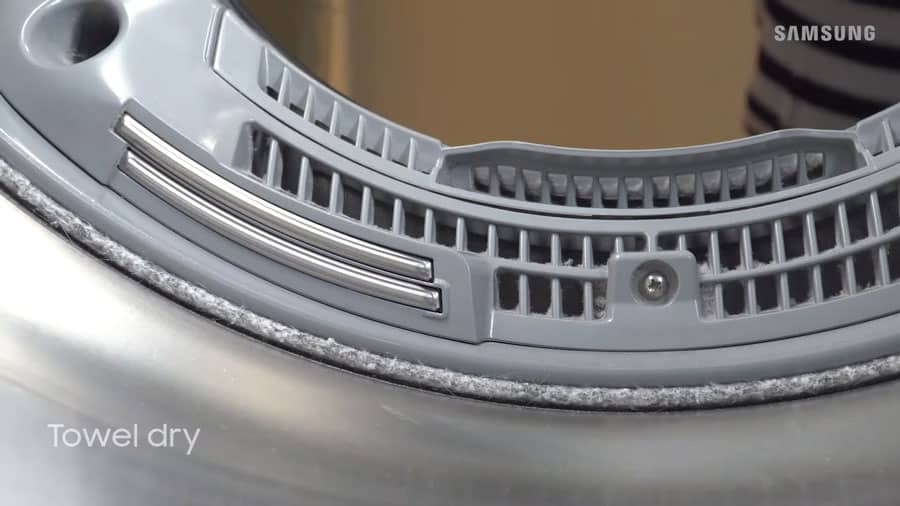
Many Samsung models use an infrared moisture sensor to gauge dryness. If the sensor is coated with fabric softener residue, it may think clothes are still wet.
- Locate the sensor bars—usually near the lint filter.
- Wipe them gently with a soft cloth dampened in rubbing alcohol.
- Run a test load; if drying improves, the sensor was the issue.
If the problem persists, the sensor circuitry might need replacement.
3. Faulty Heating Element
The heating element is the component that actually generates heat. Over time, it can develop a break or burn out.
- Unplug the dryer and remove the back panel.
- Visually inspect the element for broken coils or discoloration.
- Use a multimeter set to continuity; a zero reading means the element is dead.
Replacing a heating element is a moderate DIY task—just be sure to order the exact part number for your model.
4. Thermostat or Thermal Fuse Issues
Thermostats regulate temperature, while thermal fuses cut power if the dryer gets too hot. Either can fail in the “open” position, preventing heat.
- Locate the thermal fuse—usually a small, rectangular component on the blower housing.
- Test it for continuity; no continuity indicates a blown fuse.
- Thermostats can be tested similarly; replace any that show no continuity.
Unlike fuses, thermostats are often resettable, but many technicians recommend swapping them out to avoid future trips.
5. Drum Seals and Door Gasket
A compromised door seal can let cool air in, lowering the overall temperature inside the drum. Check the gasket for tears or warped sections and replace if needed.
When to Call a Professional
Even the most diligent homeowner can hit a wall. Consider professional help if:
- The dryer makes unusual humming or buzzing noises during the heating cycle.
- You’ve verified the heating element, fuses, and vent, yet the dryer remains cold.
- Electrical work beyond a simple plug or breaker reset is required.
Technicians have diagnostic tools that can read error codes from the dryer’s control board, saving you time and guesswork.
Quick Maintenance Checklist to Keep Your Samsung Dryer Happy
- Clean the lint filter after every load.
- Inspect the vent quarterly; clean annually.
- Wipe the moisture sensor every few weeks.
- Run a “towel test” (dry a single towel) to verify heat before large loads.
Sticking to this routine can extend the life of your dryer and keep it drying efficiently for years.
FAQ
Why does my Samsung dryer heat up but still leave clothes damp?
Often the moisture sensor is misreading the dryness level, or the vent is partially obstructed. Clean the sensor and ensure the vent is clear.
Can I replace the thermal fuse myself?
Yes, if you’re comfortable working with basic electrical components. Disconnect power, locate the fuse on the blower housing, test it with a multimeter, and swap it with an exact‑match part.
What does the error code “dE” mean on Samsung dryers?
That code typically signals a dryer‑door error or a problem with the door latch. Check that the door is fully closed and that the latch mechanism isn’t broken.
Is it safe to use a dryer that only blows air but doesn’t heat?
Running a dryer without heat isn’t dangerous, but it’s inefficient and can increase wear on the motor. It’s best to troubleshoot the heating issue before regular use.