Everything You Need to Know About 27‑inch TV Dimensions
When you’re in the market for a compact smart TV, the 27‑inch model often catches your eye. Its screen size, measured diagonally, is small enough to fit in tight corners yet large enough to enjoy streaming and gaming. But the diagonal alone doesn’t tell the whole story. Knowing the exact width, height, and how those figures translate into real‑world space is essential for a satisfying setup. Below, we break down the key numbers and practical tips so you can make an informed choice.
How 27‑inch TVs Measure: The Basics
Television dimensions are standardized around a diagonal measurement—just like a ruler. A 27‑inch TV’s diagonal is 27 inches, but the real impact comes from the screen’s width and height. Using the 16:9 aspect ratio that dominates modern displays, a 27‑inch diagonal equates to roughly 23.5 inches in width and 13.2 inches in height. These figures are the foundation for fitting the unit into your living space.
Typical Width and Height Figures
While the 23.5‑by‑13.2‑inch specification is common, manufacturers often add bezel space around the glass. This bezel can add anywhere from 0.5 to 2 inches to the overall width and height. Consequently, a typical 27‑inch TV’s external dimensions usually range from 24.5 in by 14 in to 25 in by 15 in. The depth (how far it protrudes) also varies, with most models falling between 2 in and 4 in, depending on whether a wall‑mounted or floor‑standing design is chosen.
Why These Numbers Matter When Buying
- Room Fit – A 27‑inch TV is easy to position, but if you plan to mount it on a wall, the total width must align with your mounting bracket and wall studs.
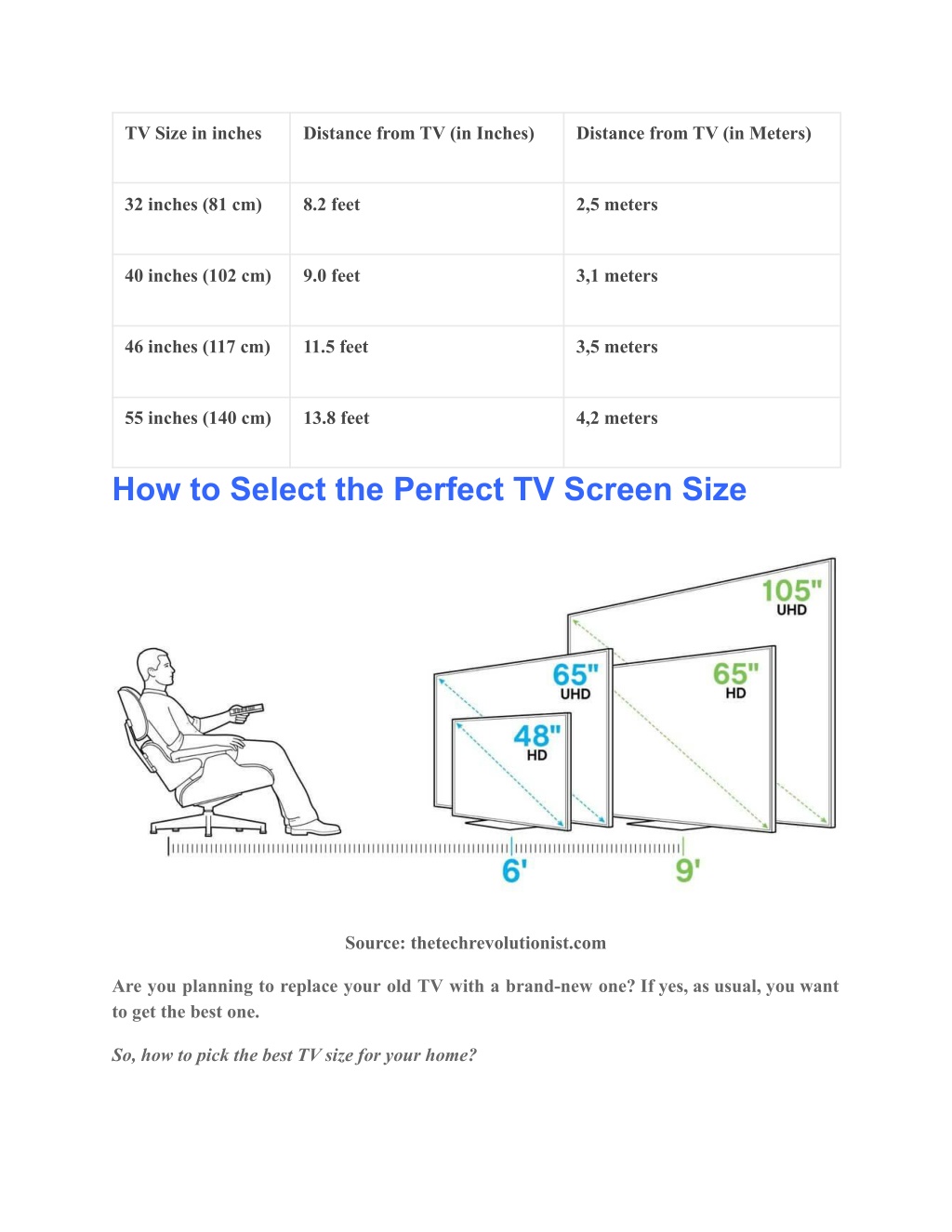
- Viewing Distance – The optimal distance for a 27‑inch screen is roughly 3 to 4 feet. Sitting closer can make the image look pixelated, while too far may reduce immersion.
- Resolution & Aspect Ratio – Most 27‑inch TVs ship with 1080p (Full HD) or 4K resolution. Understanding the pixel density helps gauge how sharp the picture will appear at your typical distance.
- Aspect Ratio – A 16:9 display is standard, but if you’re a movie enthusiast, confirming the ratio ensures your favorite titles don’t lose quality.
How to Measure Your Space Accurately
Before you pick up a box, measure the wall or shelf where the TV will reside. Use a tape measure, and record three critical dimensions: width, height, and depth. Add a margin of 1 inch on each side for cable management and ventilation. Compare these numbers to the TV’s advertised external dimensions. If you’re wall‑mounting, verify that the mount’s overhang and weight capacity match your model’s specifications.
Common Mistakes and Misconceptions
- Ignoring the Bezel – Assuming the screen size equals the TV size can lead to awkward gaps around the unit.
- Overlooking Depth – A shallow 27‑inch TV can sit flush against a wall, while a deeper model may protrude too much, blocking soundbars or speakers.
- Mixing Units – Some sellers quote metric dimensions or only provide diagonal measurements; double‑check both metric and imperial units.
- Assuming All 27‑inch TVs are the Same – Differences in bezel width, panel technology, and mounting options can affect the overall footprint.
Choosing the Right 27‑inch TV for Your Room
If your living space is small—say, a studio apartment or a compact office—a 27‑inch TV can be a perfect fit. Pair it with a minimalist soundbar placed directly on the floor or a slim wall‑mounted speaker array. For a bedroom, consider a TV that mounts flush to the wall to keep the nightstand clear. Additionally, look at connectivity: ensure the TV offers enough HDMI ports if you plan to connect multiple devices, and consider smart features if you stream frequently.
Summary of Key Takeaways
When evaluating a 27‑inch TV, start with the diagonal size but quickly shift focus to width, height, and depth—especially the bezel that adds to the overall footprint. Confirm that the TV’s external dimensions fit your intended location, and remember to account for mounting hardware and cable space. By matching the screen’s physical size with your room’s layout and your viewing habits, you’ll avoid cramped setups and enjoy crisp, immersive visuals.
FAQ
What’s the best viewing distance for a 27‑inch TV?
Most experts recommend sitting about 3 to 4 feet away. This range balances comfort and image clarity without making the pixels visible.
Do all 27‑inch TVs come in 4K resolution?
Not all. While many recent models offer 4K, some entry‑level 27‑inch TVs still ship with Full HD (1080p). Check the resolution specification before buying.
Can a 27‑inch TV fit on a bookshelf?
Yes, if the shelf’s width and depth match the TV’s external dimensions. A bookshelf that’s at least 26 in wide and 5 in deep will comfortably hold most 27‑inch models.