What iOS 14’s New Privacy Features Mean for You
When Apple rolled out iOS 14, privacy took center stage. The operating system introduced a suite of tools designed to give users more insight into how their data is collected, shared, and used. If you’ve ever wondered what iOS 14 privacy actually looks like on your iPhone, you’re not alone. Below we break down the most impactful changes, explain why they matter, and offer practical steps to keep your personal information under your own control.
iOS 14 Privacy Overview
Apple’s privacy push in iOS 14 builds on earlier efforts like App Tracking Transparency (ATT) and the App Store privacy labels. The new version adds a clearer permission system for the microphone, camera, and photo library, while also tightening location sharing rules. In everyday use, these tweaks translate to more pop‑up prompts, richer privacy summaries, and a clearer picture of which apps are peeking at your data.
App Tracking Transparency: The New Consent Layer
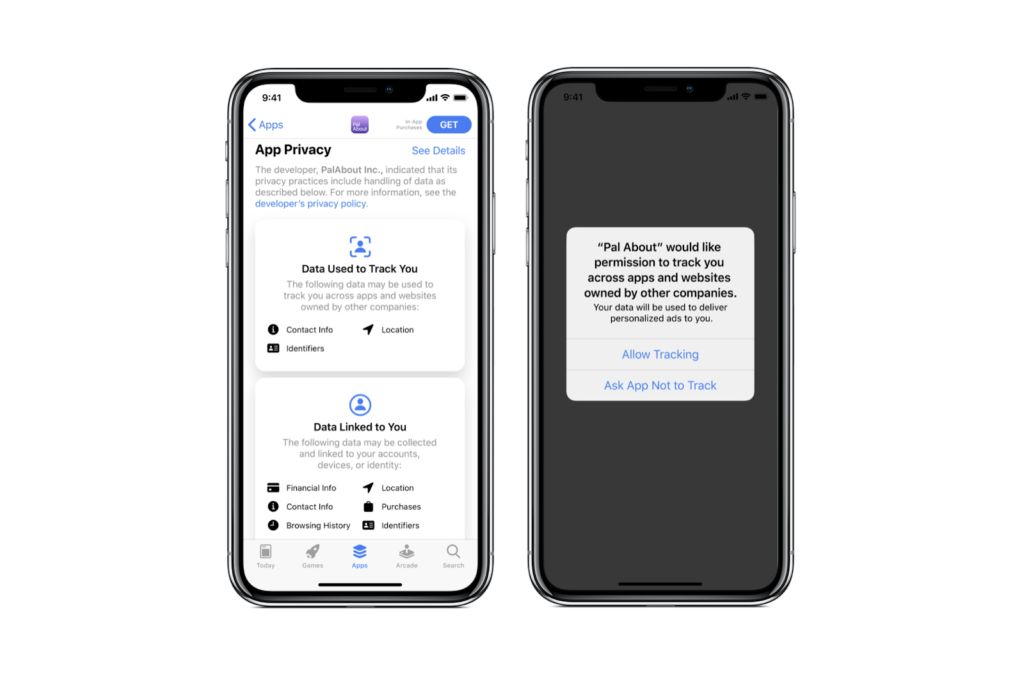
ATT isn’t brand new, but iOS 14 forces every app that wants to track you across other apps or websites to ask for explicit permission. The pop‑up that appears reads something like “Allow App Name to track your activity across other companies’ apps and websites?” Users can tap “Ask App Not to Track” or “Allow Tracking.” If you choose the former, the app receives a zeroed identifier instead of the usual advertising ID.
This shift has a ripple effect. Advertisers can no longer rely on the Identifier for Advertisers (IDFA) to build detailed profiles without consent, and many ad‑supported apps have adjusted their revenue models. For the average user, the change means fewer personalized ads and a clearer sense of when an app is trying to follow you beyond its own sandbox.
Location Controls Get Granular
Previously, apps could request “Always” or “While Using the App” access to your location. iOS 14 adds a third option: “Ask Next Time.” When you select this, the system will prompt you each time the app tries to use location services, rather than granting blanket permission. This is especially useful for fitness trackers that only need GPS during a workout, not in the background.
In addition, Apple introduced a new indicator in the status bar whenever an app is actively using your location. The small arrow icon appears briefly, reminding you that your whereabouts are being accessed. Coupled with the “Precise Location” toggle, you can now share only an approximate area instead of exact coordinates, further limiting the data shared with third‑party services.
Microphone, Camera, and Photo Library Prompts
iOS 14 refines the way apps request access to your microphone, camera, and photos. Instead of a single “Allow” button, you’ll see a brief description of why the app wants access, followed by “Don’t Allow” and “Allow” options. For the photo library, Apple introduced a “Limited Photos” selection, letting you pick specific images to share rather than granting full access.
These changes are subtle but significant. By providing context and offering a “limited” choice, Apple nudges developers to ask for only what they truly need, while giving users a straightforward way to say “no” without breaking app functionality.
Practical Tips for Managing Your Data
- Review App Permissions Regularly. Open Settings → Privacy and scroll through each category. Revoke any access that feels unnecessary.
- Use the “Ask Next Time” Option. For location services, this setting offers a balance between convenience and control.
- Limit Photo Sharing. When an app asks to access your photos, choose “Selected Photos” and pick only the images you’re comfortable sharing.
- Check the App Store Privacy Labels. Before downloading, glance at the “Data Used to Track You” and “Data Linked to You” sections to gauge an app’s data practices.
- Keep iOS Updated. Apple frequently refines privacy settings, so staying on the latest version ensures you benefit from the newest protections.
How These Changes Affect Developers
From a developer’s perspective, iOS 14 privacy reforms demand transparency and purpose‑driven data collection. Apps that previously relied on silent background tracking must now disclose their intent and obtain user consent. This often leads to redesigning ad strategies, adopting server‑side analytics that respect user choices, or offering premium, ad‑free versions to offset lost revenue.
The new “Limited Photos” and “Precise Location” options also push developers to request only the data essential for core functionality. Those who ignore the guidelines risk App Store rejection or poor user reviews, as modern iPhone owners are increasingly privacy‑savvy.
What to Expect in Future iOS Releases
Apple’s trajectory suggests even tighter controls on data sharing. Rumors point to expanded “Privacy Dashboards” that will aggregate all permissions in a single view, as well as stronger encryption for health and fitness data. While the exact features remain speculative, the pattern is clear: Apple is positioning privacy as a competitive advantage, and iOS 14 set the groundwork for a more private mobile ecosystem.
FAQs
Q: Can I still use apps that rely on IDFA after iOS 14?
A: Yes, but only if you grant them permission through the ATT prompt. If you deny, the app receives a generic identifier, which may limit personalized features.
Q: Does “Limited Photos” affect all apps?
A: Only apps that request photo library access after iOS 14 will see the option. Older apps may still request full access, but they’re encouraged to update.
Q: How do I know when my location is being used?
A: Look for the arrow icon in the status bar. It appears whenever an app accesses your location, even in the background.
Q: Will my existing app settings reset after updating to iOS 14?
A: Most permissions carry over, but you may be prompted again for any new categories (e.g., precise location or limited photo access) the next time the app requests them.